Secrets
Overview
Omnistrate allows you to include sensitive information in your deployment specifications through the use of secrets. A secret is defined as a name-value pair. Secret names can be used as placeholders in service definitions that are replaced with their respective values during a deployment. You can use secrets in various places in your Helm Charts, Kubernetes Operators, Kustomize templates, Terraform templates, OpenTofu templates, and Docker Compose configurations.
Secrets are defined at the environment type level (Dev, Stage, Prod, etc.). This means you can use different values for the same secret depending on what type of environment the deployment is launched in. For example, you could define a dbPassword secret that has the value of your development database password in your Dev environments and the value of your production database password in Prod environments.
Info
All secret values are stored as string type.
Creating Secrets
You can create and manage secrets using the Omnistrate UI, CTL, or API.
Using the UI
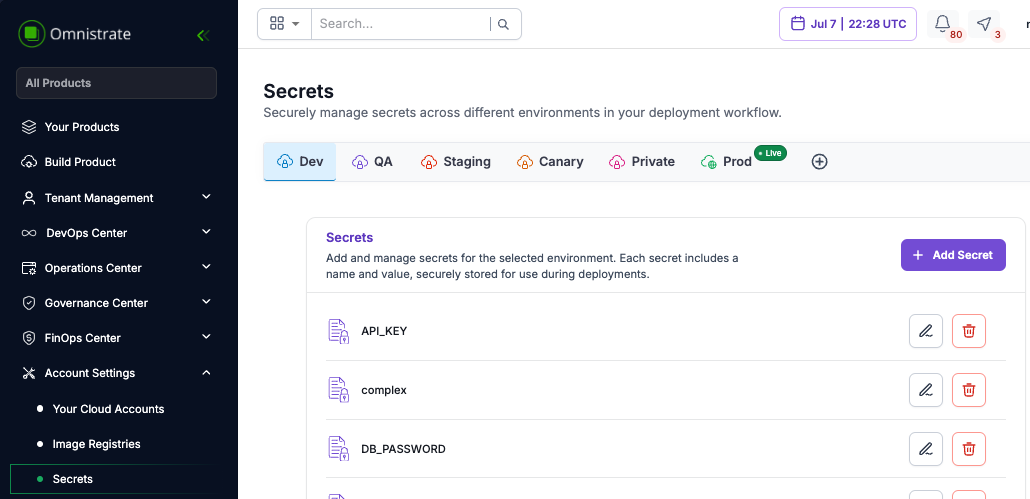
Navigate to the Secrets section in the Omnistrate console. You can create, update, and delete secrets from the environment settings.
Using the CTL
Use the following CTL commands to manage secrets:
# Create a secret
omnistrate-ctl secret create --name dbPassword --value "my-secure-password" --environment-type PROD

# List secrets
omnistrate-ctl secret list --environment-type PROD

# Update a secret
omnistrate-ctl secret update --name dbPassword --value "new-secure-password" --environment-type PROD

# Delete a secret
omnistrate-ctl secret delete --name dbPassword --environment-type PROD
Using the API
You can also manage secrets programmatically through the Omnistrate API. Refer to the API documentation for the full list of secret management endpoints.
Secret Syntax
Secrets use two syntax formats depending on the context:
| Syntax | Context | Example |
|---|---|---|
$secret.<name> | Docker Compose environment variables, Operator config | $secret.dbPassword |
$secret.<name> in templates | Helm chart layered values templates | $secret.GH_ACCESS_TOKEN |
Usage in Docker Compose
Use the $secret.<name> syntax in environment variables or configuration values:
services:
  postgres:
    image: postgres:16
    environment:
      - POSTGRESQL_DATABASE=$var.dbDatabase
      - POSTGRESQL_USERNAME=$var.dbUsername
      - POSTGRESQL_PASSWORD=$secret.dbPassword
Usage in Helm Charts
Chart values
Use the $secret.<name> syntax when referencing secrets in chartValues:
services:
  - name: Example Service
    helmChartConfiguration:
      chartName: example-chart
      chartVersion: 0.1.1
      chartRepoName: example-chart-repo
      chartRepoURL: https://raw.githubusercontent.com/omnistrate-community/example-chart-repo/main
      chartValues:
        auth:
          database: $var.dbDatabase
          username: $var.dbUsername
          password: $secret.dbPassword
Layered chart values
When using layered chart values, secrets are available as template variables. This is useful for providing private repository access tokens and other credentials:
chartValueLayers:
  - scope:
      cloudProviderRegion: "*"
    valuesFile:
      gitConfiguration:
        repositoryUrl: "https://github.com/your-org/helm-configs.git"
        reference: "refs/heads/main"
        accessToken: "$secret.GH_ACCESS_TOKEN"
      path: "values.yaml"
For more details on template variables in layered chart values, see the Layered Chart Values guide.
Usage in Operators
Secrets can be referenced in Operator configurations using the $secret.<name> syntax, the same way they are used in Docker Compose:
services:
  - name: My Operator
    operatorCRDConfiguration:
      crdName: my-operator
      helmChartConfiguration:
        chartName: my-operator-chart
        chartValues:
          operatorSecret: $secret.operatorApiKey
Usage in Kustomize and Terraform
Secrets are available in Kustomize and Terraform/OpenTofu templates using the $secret.<name> syntax. Use them anywhere you need to inject sensitive values into your deployment specifications.
Kubernetes Secrets as Cell Amenities
You can deploy Kubernetes Secret resources directly to deployment cells using cell amenities. This is useful for pre-provisioning secrets that your workloads need at the cluster level:
customAmenities:
  - name: app-secrets
    description: Application secrets
    type: KubernetesManifest
    properties:
      manifests:
        - def:
            apiVersion: v1
            kind: Secret
            metadata:
              name: app-secrets
              namespace: default
            type: Opaque
            stringData:
              API_KEY: my-api-key
For more details, see the Deployment Cell Amenities guide.
Best Practices
- Use environment-scoped secrets to maintain separate credentials for Dev, Stage, and Prod environments.
- Use the
passwordAPI param type for any user-facing sensitive inputs to ensure values are masked. - Avoid hardcoding secrets in compose files or Helm values — always use
$secret.<name>placeholders. - Rotate secrets regularly by updating secret values through the UI, CTL, or API.