Marketplace Fulfillment
Sell your SaaS Product through AWS Marketplace, Microsoft Azure Marketplace, or Google Cloud Marketplace while Omnistrate coordinates buyer onboarding, subscription fulfillment, access, and usage reporting.
Marketplace is an end-to-end distribution channel, not only a billing integration. You publish and price the listing, connect its channel to Omnistrate, map each Suger product/listing to an Omnistrate Plan, fulfill purchases, and operate the resulting subscriptions. The marketplace remains responsible for charging the buyer.
What Omnistrate Supports
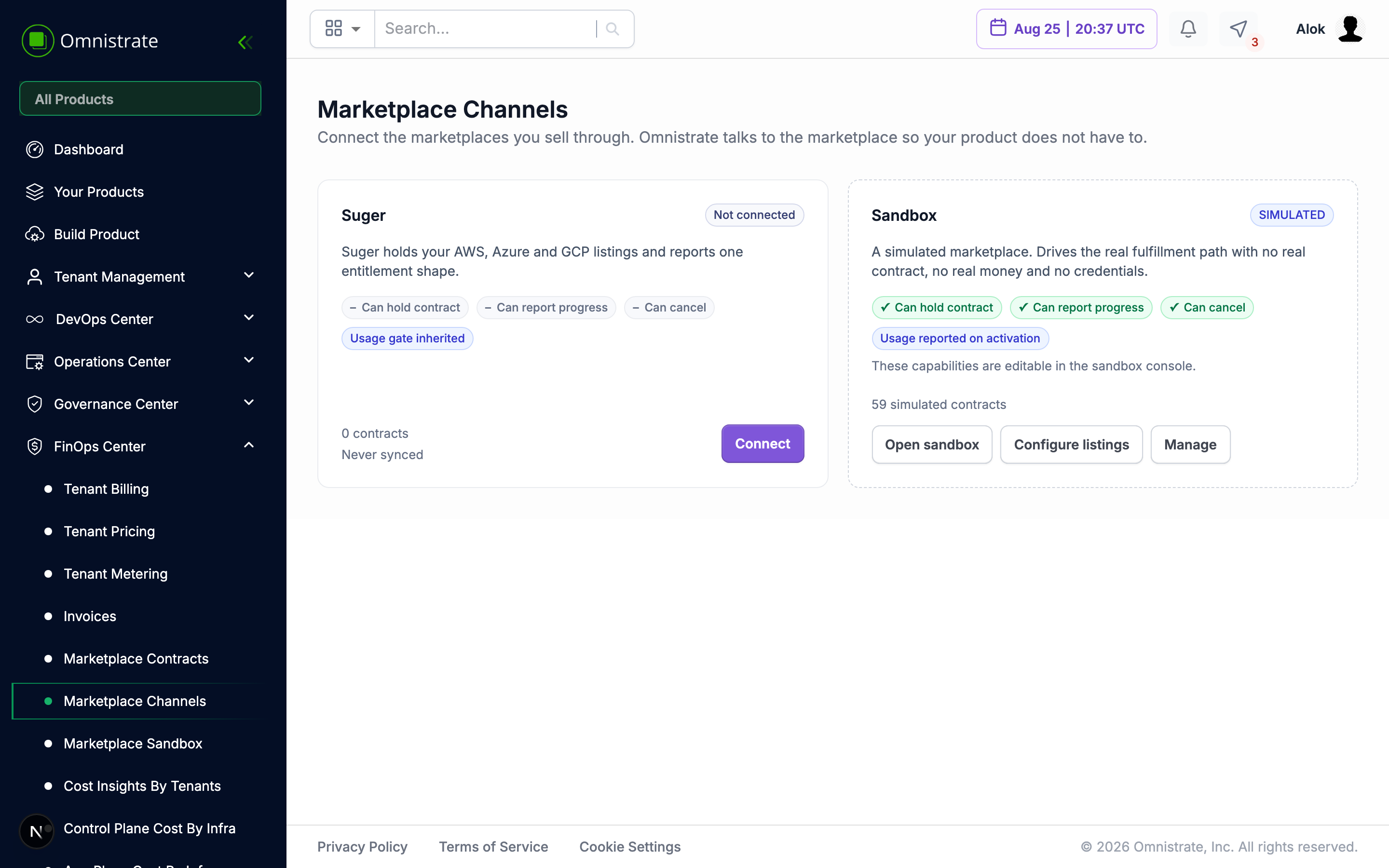
Omnistrate reaches AWS, Azure, and Google Cloud marketplaces through Suger. Suger manages the marketplace connection and presents one purchase and subscription model to Omnistrate. The Sandbox channel lets you test purchase fulfillment, lifecycle events, and usage reporting without marketplace credentials or charges.
| Channel | Purpose | Credentials | Creates billable contracts |
|---|---|---|---|
| Suger | Fulfill and report usage for marketplace listings | Suger OAuth app and webhook signing secret | Yes |
| Sandbox | Test purchase, lifecycle, and usage-reporting flows | None | No; every contract is simulated |
Publish listings before connecting them
Create and publish your products, offers, and commercial terms through Suger and the target cloud marketplace. Omnistrate does not create marketplace listings. Configure listings returns Suger products/listings and maps each one to the SaaS Product and Plan that should fulfill it.
Responsibilities
| Responsibility | Owner |
|---|---|
| Create the marketplace product/listing, offers, rates, commercial terms, and private offers | You, in Suger and the cloud marketplace |
| Configure USD unit pricing for reportable dimensions, plus custom metrics | You, in Omnistrate |
| Resolve a marketplace purchase and create the buyer organization and pending subscription request | Omnistrate |
| Provision the buyer in your product and confirm that they can be served | You |
| Create and control the Omnistrate subscription after confirmation | Omnistrate |
| Collect, aggregate, and send eligible usage to the connected channel | Omnistrate |
| Invoice the buyer, collect payment, and manage marketplace commercial terms | The cloud marketplace through Suger |
| React to plan changes, suspension, reinstatement, and cancellation in your product | You, using Omnistrate lifecycle events |
Prerequisites
Before configuring a production marketplace channel, make sure that you have:
- A released production Plan for the SaaS Product you intend to sell.
- Tenant billing enabled for your Omnistrate account.
MARKETPLACEenabled as a billing provider on the Plan.- Pricing configured on the Plan for each built-in or custom usage dimension you intend to report.
- A Suger organization, a published marketplace listing, and the Suger credentials described in Configure the Suger Channel.
- An HTTPS callback URL in your portal for the buyer handoff.
- HTTPS receiver URLs for each Omnistrate event you need to receive.
- A process that provisions or maps the buyer in your product before confirming fulfillment.
Start with the Sandbox Channel if the production listing or receiver is not ready.
End-to-End Provider Flow
1. Prepare the SaaS Product and Plan
Release the Plan in a production Environment, enable the marketplace billing provider, and configure the pricing dimensions that apply to subscriptions created from the listing. If your pricing depends on application-specific usage, declare the custom metrics on the same Plan.
Omnistrate multiplies each metered quantity by the active subscription price in USD cents before reporting it. The recommended configuration is to set the actual USD unit price in Omnistrate and price the matching marketplace dimension at USD 0.01. If you manage the actual rate in Suger instead, set the Omnistrate unit price to USD 0.01 so the reported quantity remains equal to the metered quantity. See Billing and Usage Reporting.
2. Publish the marketplace listing
Create the product/listing, offers, and commercial terms in Suger and the target cloud marketplace. Complete the commercial and marketplace review steps there. Omnistrate discovers Suger products, not a separate Suger plan catalog.
3. Connect and map the channel
Open FinOps Center → Marketplace Channels, connect Suger, and register the Omnistrate landing URL as the Suger product's Signup URL. In Event routing, register the displayed inbound webhook URL in Suger and configure a receiver URL for each Omnistrate event you need. Then map each Suger product/listing returned by Configure listings to the matching Omnistrate SaaS Product and Plan.
The mapped Plan must be a production Plan with MARKETPLACE enabled as a billing provider. See Configure the Suger Channel.
4. Test in the Sandbox
Connect the Sandbox channel, map one of its listings to the same Plan, and simulate a purchase. Exercise confirmation, plan and quantity changes, suspension, reinstatement, cancellation, and usage reporting before enabling the production channel.
See The Sandbox Channel and Simulation Controls.
5. Fulfill a purchase
The purchase flow is:
- A buyer completes a purchase on AWS, Azure, or Google Cloud Marketplace.
- The marketplace sends the buyer to Suger, which redirects the browser to the Omnistrate landing URL.
- Omnistrate resolves the entitlement, creates a buyer organization and root user, and creates a
PENDINGsubscription request for the mapped Plan. - Omnistrate sends the handoff through your callback URL or, when that event has a route, a signed
contract.discoveredwebhook. - You redeem the handoff when needed, create or map the tenant in your product, and call confirm.
- Confirmation approves the request and creates the Omnistrate subscription. The buyer can then deploy, subject to the contract's current lifecycle state.
Until confirmation succeeds, no subscription exists. Suger cannot hold the upstream contract, so a real buyer may already be charged while the contract waits for you in AWAITING_ISV.
See Contract Lifecycle for the states and API Guide for the handoff and confirmation calls.
6. Operate the subscription
After activation, keep the marketplace contract and your product tenant synchronized:
- Apply plan or quantity changes from
entitlement.updated. - Restrict access without deleting data on
contract.suspended. - Restore access on
contract.reinstated. - Keep serving the buyer when
contract.endingannounces a future cancellation, and submit remaining usage within the reported window. - Begin offboarding after
contract.cancelled; Omnistrate revokes subscription access before sending that event.
A receiver route is required for each of these events because there is no browser redirect after the initial purchase. An event with no route is not delivered.
7. Verify usage reporting
Omnistrate aggregates eligible usage into hourly windows and reports it through the same channel as the contract. Use the Sandbox channel to inspect the records that would be sent. For a real subscription, open FinOps Center → Tenant Metering and select the tenant. Use Metering to verify the underlying quantities and Usage Reporting to inspect recent attempts, requests, responses, and failures.
See Billing and Usage Reporting for eligibility rules, statuses, and diagnostics.
Contract State and Fulfillment State
Every contract has two states:
contractStatusis the status reported by Suger and the cloud marketplace.fulfillmentStateis the result of Omnistrate fulfillment and governs whether the buyer can deploy. Usage reporting also requires the marketplace contract to permit reporting.
A contract can be ACTIVE upstream while its fulfillment state is AWAITING_ISV. Branch on fulfillmentState when deciding whether the buyer can use your product.
Where to Go Next
| Goal | Guide |
|---|---|
| Connect credentials, callback URLs, and listings | Configure the Suger Channel |
| Configure pricing and usage reporting | Billing and Usage Reporting |
| Build and test without a real purchase | The Sandbox Channel |
| Rehearse lifecycle transitions | Simulation Controls |
| Understand activation, suspension, and cancellation | Contract Lifecycle |
| Implement webhook verification and fulfillment calls | API Guide |