Contract Lifecycle
A marketplace contract connects the purchase reported by the channel to its fulfillment and subscription lifecycle in Omnistrate. This page covers what happens between a purchase and a served buyer, and how to diagnose a contract that needs attention.
Fulfillment States
fulfillmentState is what Omnistrate decided and governs whether the buyer can deploy. Usage reporting also requires the marketplace contract to permit reporting; see Billing and Usage Reporting.
| State | Meaning | Buyer can deploy |
|---|---|---|
DISCOVERED | The purchase reached Omnistrate. Nothing exists on our side yet | No |
IDENTIFIED | Organization and root user created. The buyer has an Omnistrate identity | No |
AWAITING_ISV | Subscription request is PENDING. We are waiting on you | No |
READY | You confirmed. The request was approved and the subscription created | Yes |
SUSPENDED | The marketplace suspended the contract, usually non-payment | No |
DEPROVISIONING | Cancellation is in progress; access is revoked while final usage is handled | No |
CLOSED | Cancellation is complete; the contract remains as an audit record | No |
Branch on fulfillmentState, never on contractStatus
contractStatus is what the marketplace says, and it is normally ACTIVE from the instant of purchase. A contract at ACTIVE / AWAITING_ISV is a buyer who is paying and cannot yet be served. Reading contractStatus to decide whether to serve someone will serve them too early.
Subscription Lifecycle
Marketplace changes arrive from the channel and are reflected in both the contract and its Omnistrate subscription. When the corresponding event has a receiver configured, Omnistrate delivers it after applying any access change.
| Marketplace change | Omnistrate behavior | What you should do |
|---|---|---|
| Purchase confirmed | Approves the pending request, creates the subscription, and moves fulfillment to READY | Enable the tenant after the confirm call succeeds |
| Plan, quantity, or term changed | Emits entitlement.updated; the subscription is not automatically moved to a different Plan | Apply the new limits or product configuration in your system |
| Contract suspended | Revokes subscription access, moves fulfillment to SUSPENDED, then emits contract.suspended | Restrict access, but preserve the buyer's data |
| Contract reinstated | Restores subscription access, returns fulfillment to READY, then emits contract.reinstated | Restore access and resume normal service |
| Cancellation scheduled | Leaves the subscription active and emits contract.ending with the remaining usage-reporting window | Keep serving the buyer and ensure remaining usage is submitted before the deadline |
| Contract cancelled or expired | Revokes subscription access and emits contract.cancelled | Begin your product-specific offboarding and retention process |
Cancellation does not delete your product data
Omnistrate prevents further use of the marketplace-backed subscription. Your product is responsible for applying its retention, export, and deletion policy after contract.cancelled.
For access purposes, cancellation or expiration is the terminal subscription lifecycle transition. The contract remains visible in Omnistrate for audit and troubleshooting.
The initial purchase uses the browser callback unless contract.discovered has a receiver route. Later lifecycle changes have no browser handoff, so configure a receiver for each event you need before enabling a production listing.
Fulfillment stages
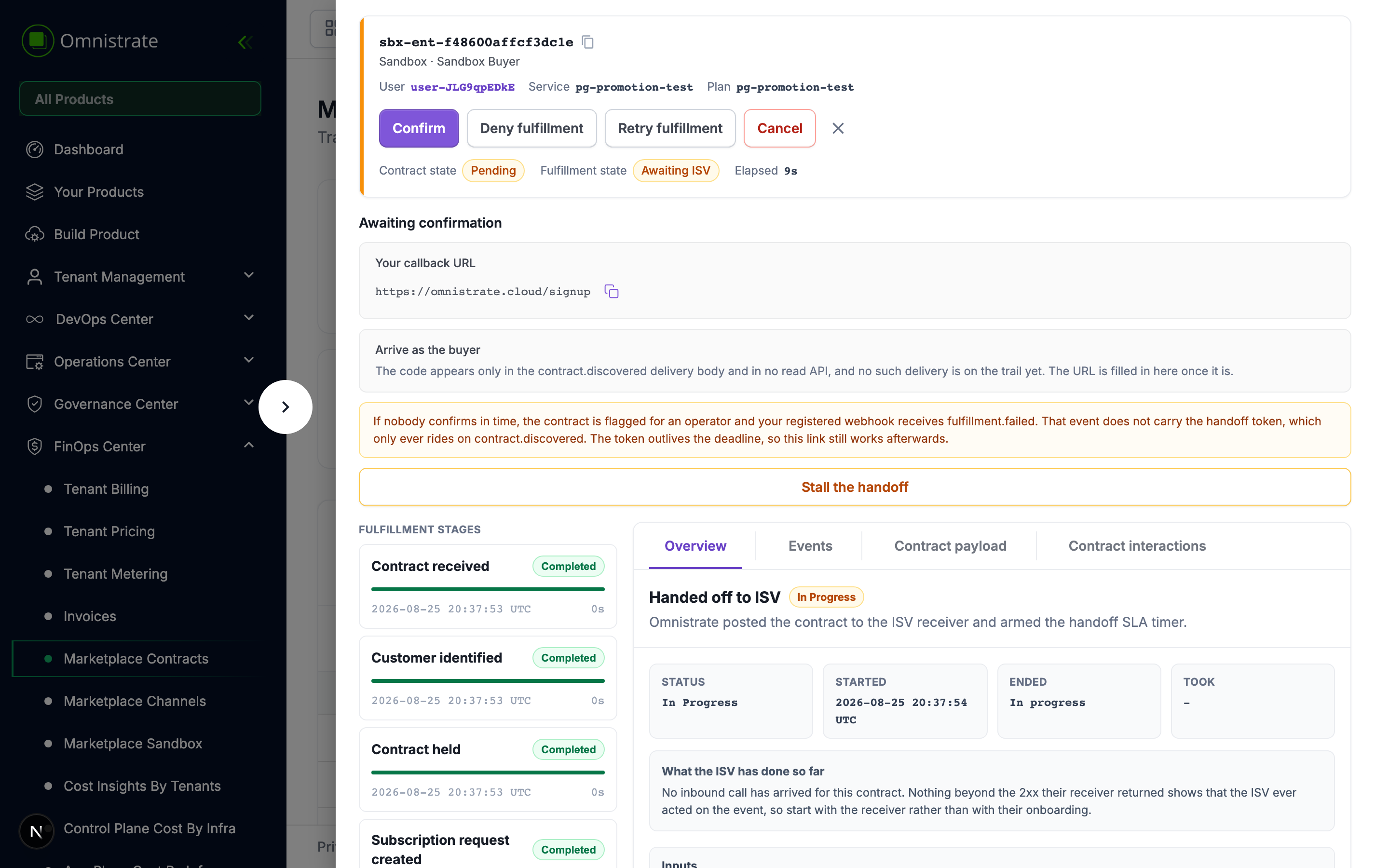
The state is a summary. The stages show what happened, when each step started and ended, and how long it took.
| Stage | What happened | Parameters shown |
|---|---|---|
| Contract received | The arrival was resolved against the channel | Channel, external reference |
| Customer identified | The buyer became an organization and a root user | Buyer reference, buyer name |
| Contract held | The channel was asked to keep the buyer un-charged, where it can | Channel, whether it can hold |
| Subscription request created | A PENDING request against the mapped plan | Organization, plan, quantity |
| Handed off to ISV | You were told, and the SLA timer armed | Organization, root user email, handoff SLA |
| ISV confirmed | Your confirm arrived and the request was approved | Plan, quantity |
| Contract committed | The channel was told to begin charging | External reference, whether it can hold |
| Ready | The subscription exists. Deployments are open; usage reporting starts when the marketplace permits it | Subscription, organization |
| Closed | The contract ended | Contract state |
Contract held is a no-op on Suger, which cannot hold a contract — the buyer is already being charged by the marketplace before Omnistrate is called. The stage still appears, and says so, because "we did not do this and here is why" is more useful than a gap.
The handoff stage is the one that waits
Handed off to ISV stays In progress for as long as the contract sits in AWAITING_ISV. That is not a stall — the handoff is not complete when we have handed it over, it is complete when you answer.
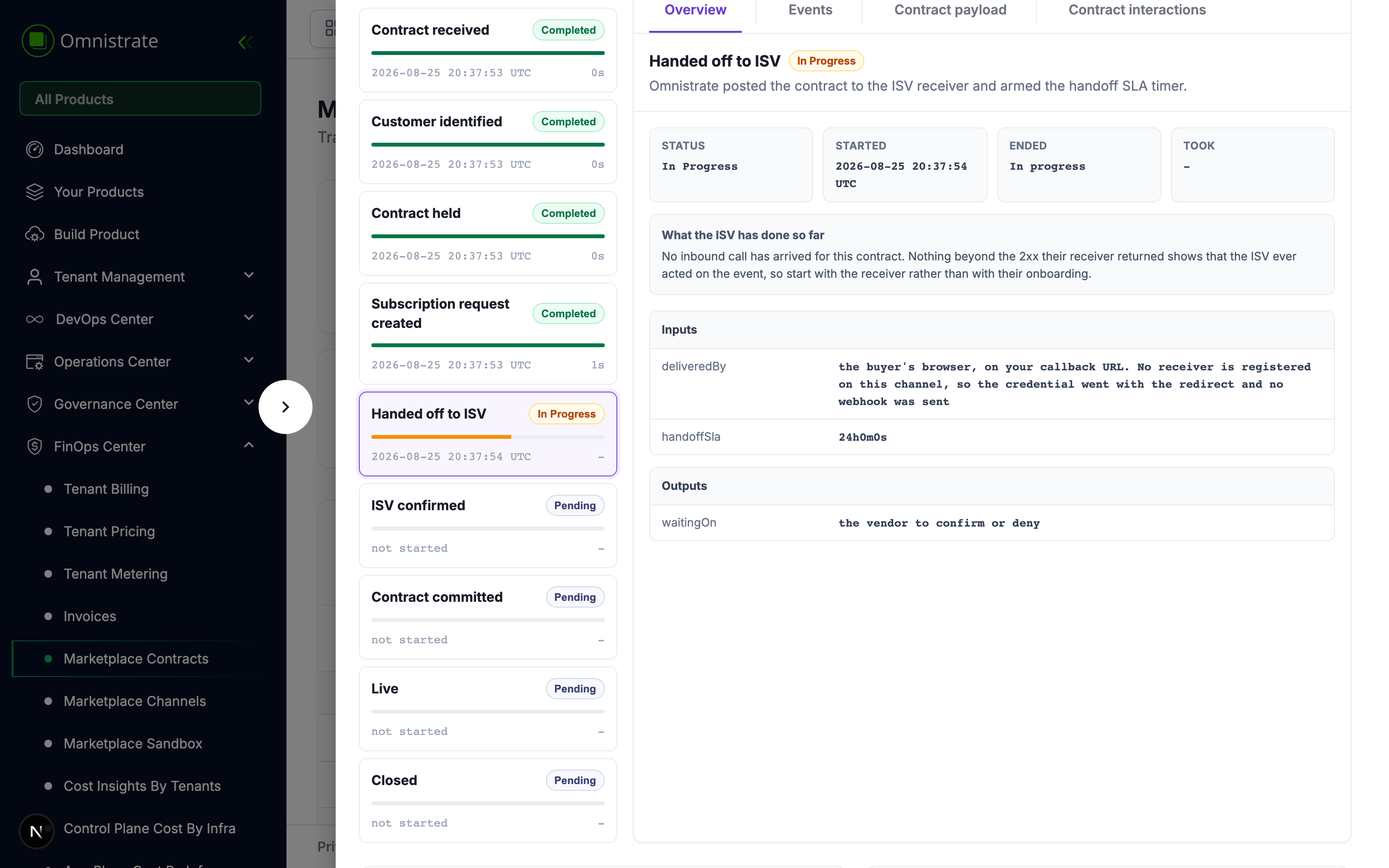
Its parameters tell you how the buyer reached you and how long you have:
- Delivered by — either a signed webhook to the
contract.discoveredreceiver, or the buyer's browser, on your callback URL. This is decided by the effective route forcontract.discovered. - Handoff SLA — how long before the contract is flagged and
fulfillment.failedis emitted. - What the ISV has done so far — whether any inbound call has arrived for this contract. If nothing has, start with the effective
contract.discoveredroute rather than with the onboarding code.
Reading a contract when something is wrong
The contract screen carries four tabs, and they answer different questions.
Overview — what this stage did, with its timings.
Events — what Omnistrate emitted at this stage.
Contract payload — what the channel said, verbatim. This is the answer to "did the marketplace really tell us that".
Contract interactions — both directions of the integration in one ordered stream: the events we sent you and the calls you made back.
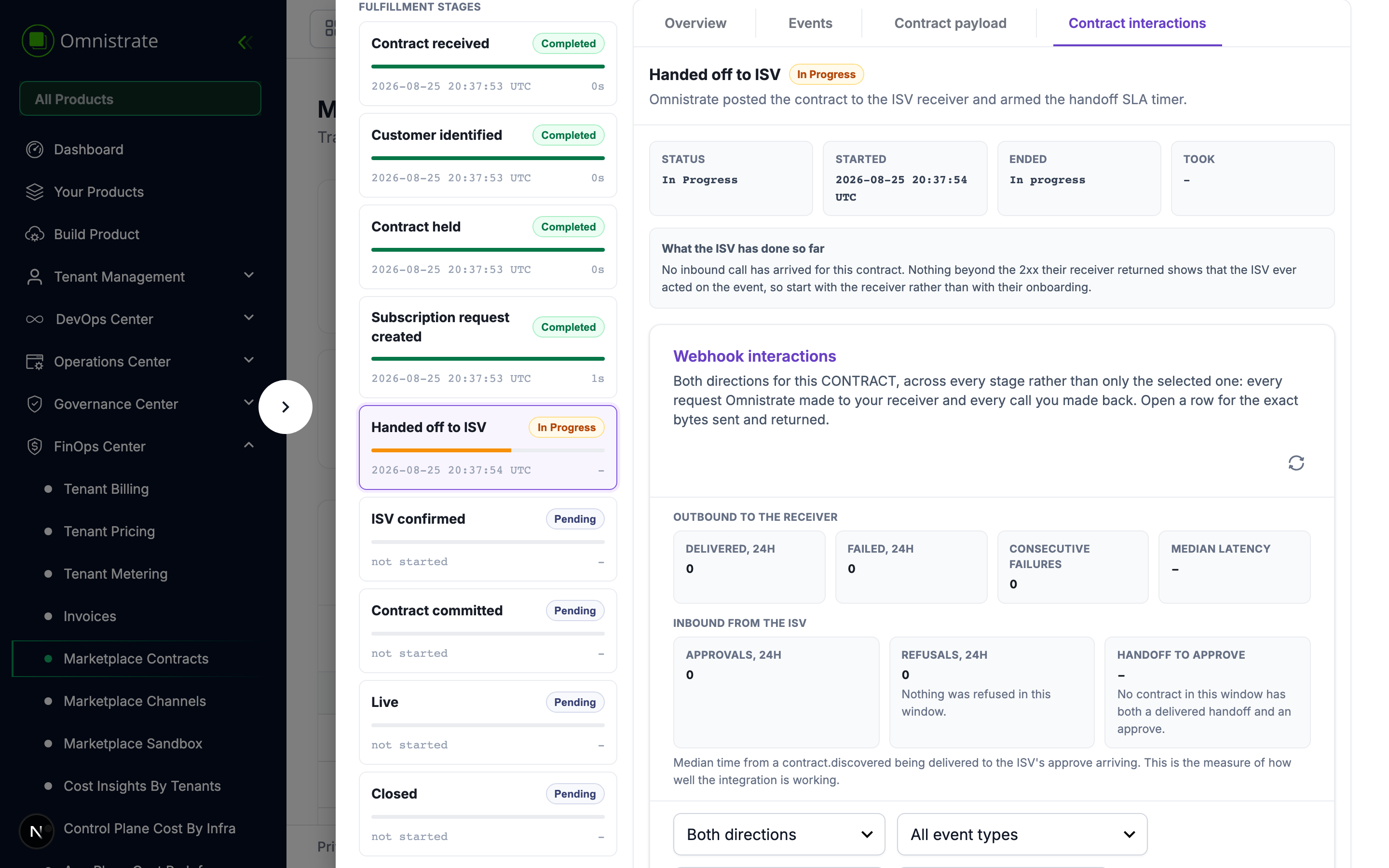
The interleaving is usually the diagnosis. "We sent contract.discovered at 09:04, they redeemed the handoff at 09:06 and never confirmed" is one sequence, and splitting it across two screens would make the support answer a manual merge of two lists.
Each outbound row carries the exact request bytes and the signature header that went with them, so when an ISV says a signature does not verify, you compare their digest against the one actually sent rather than against a recomputed copy.
The contracts list
FinOps Center → Marketplace Contracts shows every contract with the channel's state and Omnistrate's state as separate columns, because they answer different questions and a single merged column would hide exactly the case that matters.
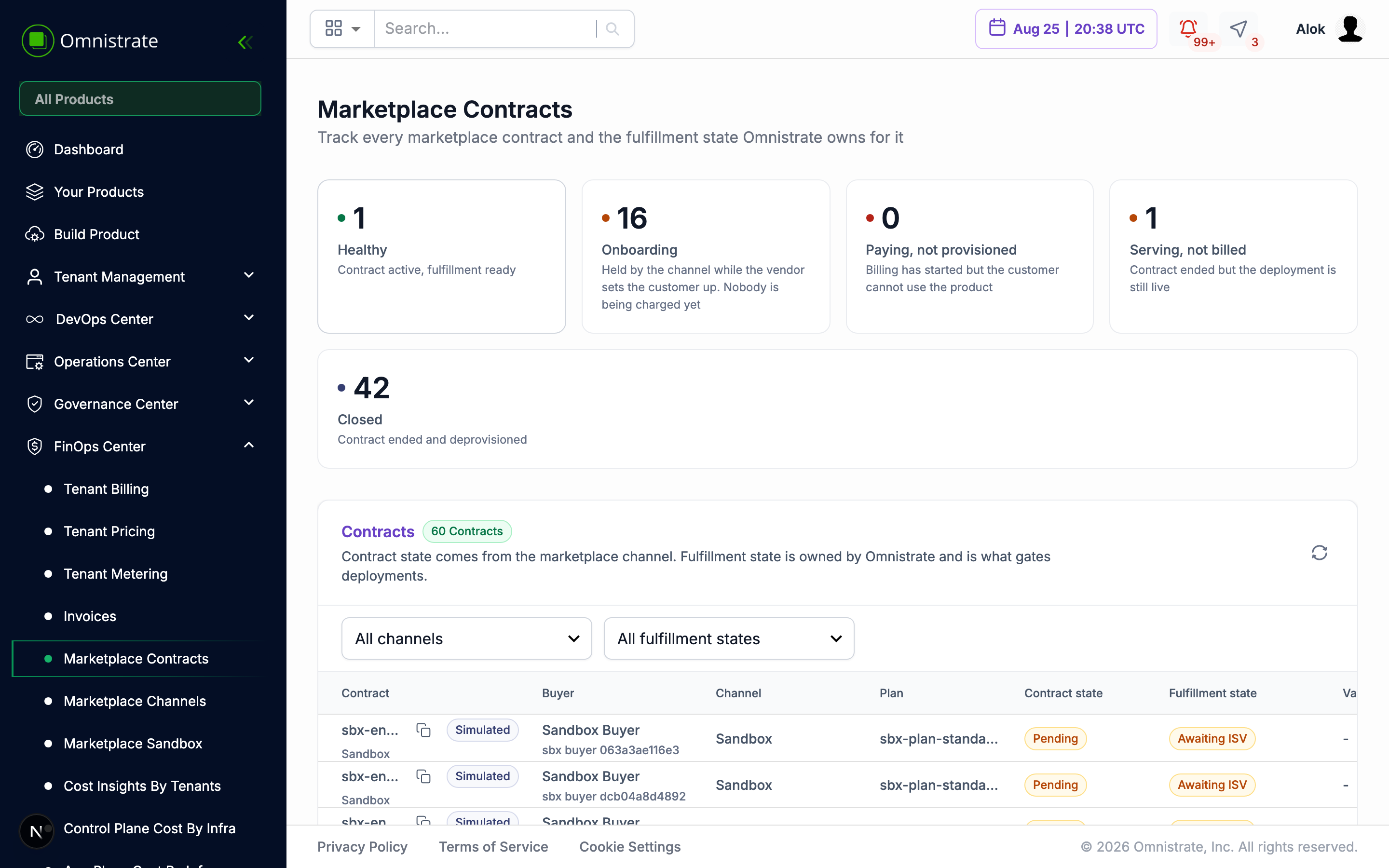
The strip along the top groups contracts into quadrants. The one to watch is paying and not provisioned: a buyer the marketplace is charging whom nobody has confirmed. Simulated contracts are not included in those totals.
When nobody confirms
If the handoff SLA passes with no confirm, the contract is flagged for an operator and fulfillment.failed is emitted when that event has a configured receiver. The contract stays in AWAITING_ISV — it is not closed, and the buyer is not refunded — because the usual remedy is that the SaaS Provider confirms late.
fulfillment.failed does not carry a handoff token. The token only ever rides on contract.discovered. It outlives the SLA, so if you still hold it you can redeem and confirm afterwards.
Retry fulfillment on the contract re-enters the run and re-emits contract.discovered when that event has a configured receiver. A callback-only integration cannot reopen or repeat the buyer's browser redirect; retry redeeming and confirming with the token from the original callback instead.