Alarms
Overview
Alarm configuration is a global setting that allows an organization to subscribe to various Alerts and/or Notifications and forward them to supported notification channels. Notification settings can be modified in the UI under "Manage Account" -> "Alarm Settings". Each channel offers four types of filters:
- Environment type - allows filtering based on environment type. Example: PROD / QA / DEV
- Alert Event Type - allows filtering based on type of alert. Example: Alert / Notification
- Alert Event Priority - allows filtering based on priority of alert. Example: Low / Medium / High / Critical
- Event Category - allows filtering based on category. Example: InstanceEvents / UserEvents / DeploymentCellEvents, etc.
- Event Type - allows filtering based on specific event type. Example: UnhealthyInstance / UserSignUp / DeploymentCellDeleteStarted, etc.
- Payload - a json structure with properties of the event. Example: instance_id, subscription_id
Each organization can configure multiple channels with different event filters.
Interpreting instance health alerts
Alerts complement, but do not replace, the health state shown on an instance.
In practice:
UnhealthyInstancemeans one or more required health signals failed.- A running pod does not automatically mean the instance is healthy.
- Endpoint reachability, readiness, custom health checks, and dependent integrations can all affect alerting and health state.
When you receive an instance health alert, check:
- The instance health details in the Operations Center
- The workflow that last changed the instance
- Instance debug output for rendered Helm or Terraform artifacts
For more detail on health-state semantics, see Monitoring and Debugging and Troubleshooting.
Supported notification channels
Email
Email channel sends notification as email message to email address provided in email channel configuration.
PagerDuty
PagerDuty channels sends notification as PagerDuty alert. Recipient is identified by PagerDuty integration key that needs to be provided during configuration.
For more details on how to generate integration key, refer to this PagerDuty documentation.
Webhook
Webhook calls HTTP-based callback function with configurable payload. By default, Omnistrate will include following details as request body:
{
   "eventID": "{{ $var.id }}",
   "serviceID": "{{ $var.ServiceID }}",
   "eventName": "{{ $var.Name }}",
   "eventDescription": "{{ $var.Description }}",
   "eventType": "{{ $var.Type }}",
   "payload": "{{ $var.Payload }}"
}
Webhook channel allows method, endpoint and payload to be provided. If webhook action fails, we will retry few times before failing to notify this channel of the event.
Signing webhook deliveries
An endpoint that accepts any POST it receives will act on anything that reaches it. Give the channel a signing secret and every delivery arrives with an HMAC-SHA256 signature your receiver can check, so it can tell a real alarm from a request that merely knows the URL.
Set it when you create or edit a Webhook channel:
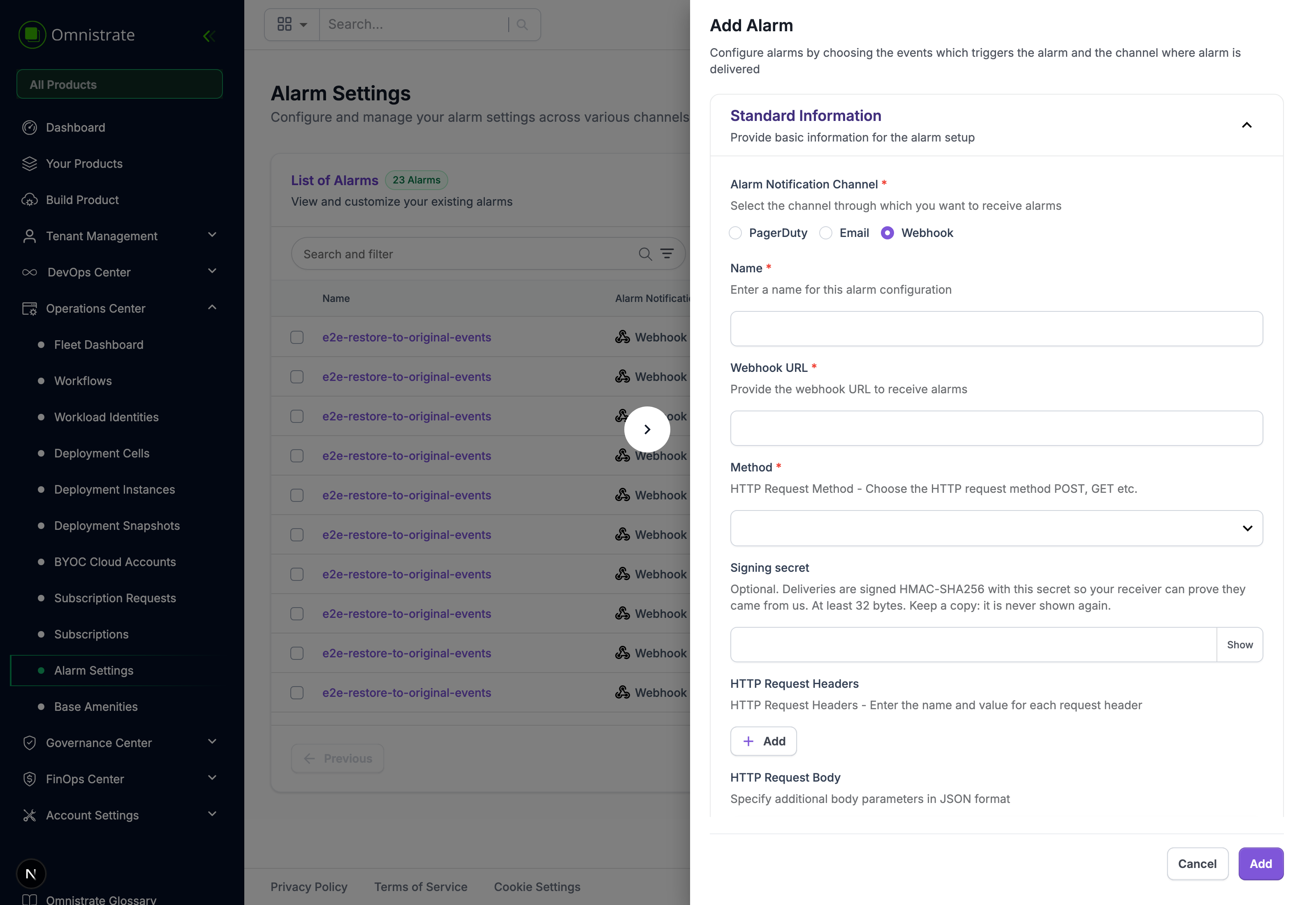
The secret must be at least 32 bytes. That is not an arbitrary minimum: deliveries are signed with HMAC-SHA256, and RFC 2104 discourages a key shorter than the hash output because it weakens the function. A short key still produces a perfectly valid signature — it is simply cheaper to forge than the algorithm's name suggests.
It is stored encrypted and never returned by any read, so keep your copy. A configured channel shows that signing is on, and an identifier for the active secret, so you can confirm a rotation took effect without the secret itself ever being displayed.
Headers on every delivery
Five headers accompany a signed delivery, alongside Content-Type: application/json and any static headers you configured:
| Header | Example | What it is for |
|---|---|---|
X-Omnistrate-Signature-256 | sha256=24be8a3e… | HMAC-SHA256 of the signed payload, lowercase hex |
X-Omnistrate-Event-Id | evt-3c3d521bd975 | The event's own id. Stable across retries — deduplicate on it |
X-Omnistrate-Event-Type | FailedBackup | The alarm event type, matching the table below |
X-Omnistrate-Timestamp | 2026-08-25T07:58:45Z | RFC 3339 UTC, taken when the request is sent |
X-Omnistrate-Delivery-Attempt | 1 | Starts at 1 |
A complete request looks like this:
POST /omnistrate/alarms HTTP/1.1
Host: hooks.example.com
Content-Type: application/json
X-Omnistrate-Event-Id: evt-3c3d521bd975
X-Omnistrate-Event-Type: FailedBackup
X-Omnistrate-Timestamp: 2026-08-25T07:58:45Z
X-Omnistrate-Delivery-Attempt: 1
X-Omnistrate-Signature-256: sha256=24be8a3ec41a191588bb4a28cf5cef833f8fcef9050eada0fbd2d2b140b292b8

{"eventID":"evt-3c3d521bd975","serviceID":"s-Xy2ZaBcDeF","eventName":"FailedBackup", ...}
Your own configured headers are applied first, so a header you set cannot displace the signature.
Verifying the signature
Sign the timestamp together with the body
The signed material is <X-Omnistrate-Timestamp> + . + <raw request body> — not the body alone. Binding the timestamp in is what lets you enforce a freshness window: without it, someone who captures one delivery can replay it forever under a fresh timestamp and the signature still verifies.
Verify against the raw bytes, before any parsing or re-serialization. Pretty-printing or re-encoding the JSON changes the bytes and the digest will not match.
const timestamp = req.headers['x-omnistrate-timestamp'];
const signature = req.headers['x-omnistrate-signature-256'];
if (typeof timestamp !== 'string' || typeof signature !== 'string') {
  return res.status(401).end();
}

// rawBody is the unparsed request body. In Express, use express.raw() or capture it in a verify hook.
const signed = `${timestamp}.${rawBody}`;
const expected = 'sha256=' + crypto
  .createHmac('sha256', process.env.OMNISTRATE_WEBHOOK_SECRET)
  .update(signed, 'utf8')
  .digest('hex');

// Constant time, so a mismatch cannot be found one character at a time.
const expectedBuf = Buffer.from(expected, 'utf8');
const signatureBuf = Buffer.from(signature, 'utf8');
if (expectedBuf.length !== signatureBuf.length || !crypto.timingSafeEqual(expectedBuf, signatureBuf)) {
  return res.status(401).end();
}

// Then reject anything too old to be a live alarm. Five minutes is a reasonable window.
if (Date.now() - Date.parse(timestamp) > 5 * 60 * 1000) {
  return res.status(401).end();
}
What your receiver should do
- Answer quickly with any 2xx, and do the work asynchronously. A receiver that blocks holds the delivery open.
- Deduplicate on
X-Omnistrate-Event-Id. It is stable across retries and across an operator re-sending an event, which is deliberate: re-sending exercises your idempotency rather than bypassing it. - Use HTTPS. Redirects are not followed — following one on a signed POST would either strip the body and signature or replay them at a host you never registered.
The same signing scheme is used for marketplace fulfillment webhooks. See Marketplace fulfillment API if you integrate with those as well.
Channels configuration
Omnistrate generates a variety of Notifications and Alerts whenever a corresponding event occurs. Each notification channel can be configured to receive only specific types (based on event type, environment, priority, etc.).
To add new channel, open "Manage account" -> "Notifications" page on UI where you will be able to add new channel. There are 2 configuration options available when adding a channel:
-
Basic - subscription is created based on environment type, alert event type and event priority. This option offers less control, but makes it easier to create a channel based on fewer inputs. All of basic dimensions (environment, type and priority) have limited set of options that are unlikely to change as we add new types of alerts. An example of a basic notification rule: "High and critical priority Alerts from prod environments".
-
Advanced - subscription is created based on environment type and specific category and/or event type. This option offers more control, but is based on event categories.
Alarm Event Categories and Type
The following table lists all available alarm event categories and the specific event types within each. For the payload delivered with each event, see Webhook Alarm Event Payloads.
| Category | Type | Description |
|---|---|---|
| InstanceEvents | FailedBackup | Instance backup operation failed |
| FailedDelete | Instance deletion failed | |
| FailedDeployment | Instance deployment failed | |
| StartedDeployment | Instance deployment process initiated | |
| FailedRecovery | Instance recovery operation failed | |
| FailedRestore | Instance restore operation failed | |
| FailedRestart | Instance restart failed | |
| FailedSnapshotCopy | Instance snapshot copy operation failed | |
| FailedSnapshotCreate | Instance snapshot creation failed | |
| FailedSnapshotDelete | Instance snapshot deletion failed | |
| FailedStart | Instance start operation failed | |
| FailedStop | Instance stop operation failed | |
| FailedUpdate | Instance update operation failed | |
| HighCPUUsage | Instance CPU usage exceeds threshold | |
| RecoveryStarted | Instance recovery process initiated | |
| ScaleDownFailed | Instance scale down operation failed | |
| ScaleDownSuccess | Instance scale down completed successfully | |
| ScaleUpFailed | Instance scale up operation failed | |
| ScaleUpSuccess | Instance scale up completed successfully | |
| StartedDelete | Instance deletion process initiated | |
| StartedRestore | Instance restore process initiated | |
| SuccessfulBackup | Instance backup completed successfully | |
| SuccessfulDelete | Instance deleted successfully | |
| SuccessfulDeployment | Instance deployed successfully | |
| SuccessfulRecovery | Instance recovery completed successfully | |
| SuccessfulRestore | Instance restore completed successfully | |
| SuccessfulRestart | Instance restarted successfully | |
| SuccessfulSnapshotCopy | Instance snapshot copy completed successfully | |
| SuccessfulSnapshotCreate | Instance snapshot created successfully | |
| SuccessfulSnapshotDelete | Instance snapshot deleted successfully | |
| SuccessfulStart | Instance started successfully | |
| SuccessfulStop | Instance stopped successfully | |
| SuccessfulUpdate | Instance updated successfully | |
| UnhealthyCustomerIntegration | Customer integration is unhealthy | |
| UnhealthyInstance | Instance health check failed | |
| UnhealthyIntegration | Integration is unhealthy | |
| UserEvents | ApproveSubscriptionRequest | Subscription request approved |
| UserSignUp | New user registration | |
| UserSubscription | User subscription created | |
| UserSubscriptionInvite | User invited to subscription | |
| UserSubscriptionRevoked | User subscription access revoked | |
| UserUnsubscribed | User unsubscribed from service | |
| UserDeleted | User account deleted | |
| IdentityProviderEvents | FailedIdentityProviderVerification | Identity provider verification failed |
| SystemEvents | UpgradeScheduled | System upgrade scheduled |
| UpgradeMaintenanceActionRequest | Maintenance action requested for upgrade | |
| UpgradePaused | System upgrade paused | |
| BillingEvents | S3MeteringExportFailed | S3 metering export operation failed |
| GCSMeteringExportFailed | GCS metering export operation failed | |
| InvoiceGenerateSuccess | Invoice generation completed successfully | |
| MarketplaceUsageReportingFailed | Marketplace usage reporting to a marketplace channel failed | |
| DeploymentCellEvents | DeploymentCellCreateCompleted | Deployment cell creation finished |
| DeploymentCellCreateStarted | Deployment cell creation initiated | |
| DeploymentCellDeleteCompleted | Deployment cell deletion finished | |
| DeploymentCellDeleteStarted | Deployment cell deletion initiated | |
| DeploymentCellUpdateCompleted | Deployment cell update finished | |
| DeploymentCellUpdateStarted | Deployment cell update initiated | |
| DeploymentCellCompleted | Deployment cell operation completed | |
| DeploymentCellStarted | Deployment cell operation started | |
| DeploymentCellInProgress | Deployment cell operation in progress | |
| HostClusterCleanup | Host cluster cleanup operation | |
| RepairingDeploymentCellStarted | Deployment cell repair process initiated |