BYOC On-Premise
BYOC On-Premise lets a customer bring an existing Kubernetes cluster and use it as the deployment target for your Product. Omnistrate treats this target as the byoc-onprem provider with the on-prem deployment region.
The customer owns the Kubernetes cluster, nodes, storage, network routing, and endpoint exposure. Your generated control plane operates deployments in that cluster through your product dataplane agent.
Note
byoc-onprem is the value you pass to the --cloud-provider flag in omnistrate-ctl (for example omnistrate-ctl instance create --cloud-provider=byoc-onprem).
BYOC On-Premise is configured as a BYOC deployment Plan. Set up the provider side the same way you would for other BYOC Plans, then pass --cloud-provider=byoc-onprem when creating customer onboarding instances and product deployments. For the shared BYOC flow, see BYOC cloud accounts. For the Plan schema, see deployment schema.
This mode is different from an air-gapped installer. In BYOC On-Premise, the customer stays connected to your generated control plane. For air-gapped or fully disconnected environments, use the Air-Gapped installer model instead.
Architecture
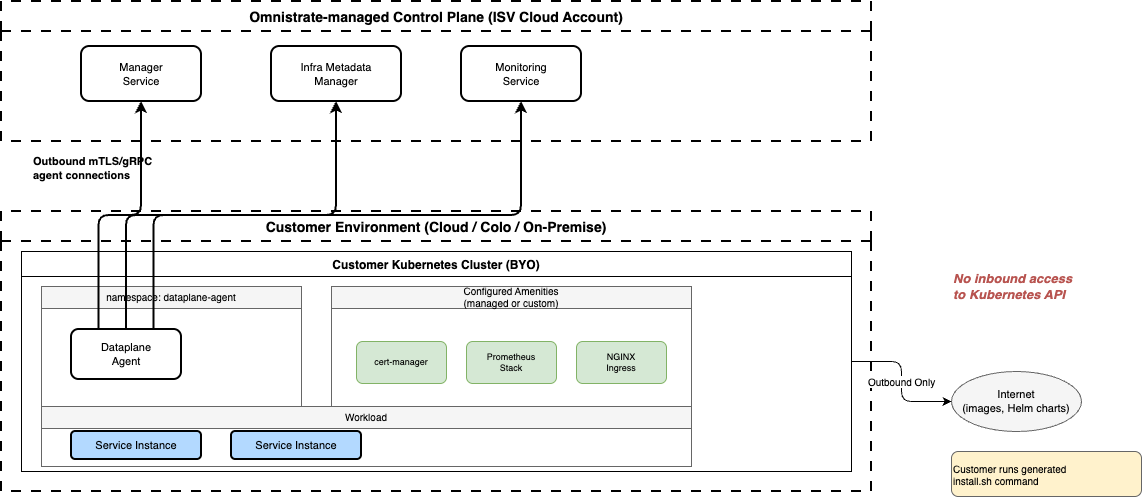
The product dataplane agent runs in the customer cluster and opens outbound mTLS/gRPC agent connections to your control plane. The same agent connection pattern is used for the Manager Service, Infra Metadata Manager, and Monitoring Service.
The customer does not need to expose the Kubernetes API server publicly. The cluster needs outbound access to your control plane endpoints, plus any image registries and Helm chart registries required by your Plan and deployment-cell amenities.
Application traffic is separate from control-plane traffic. The customer decides whether product endpoints are private-only, reachable through a corporate network, or exposed through a public IP or load balancer.
Before You Start
Confirm the customer cluster has the baseline requirements for your product:
| Requirement | Details |
|---|---|
| Kubernetes cluster | A working Kubernetes cluster with a supported Kubernetes version |
kubectl access | The operator running the installation kit must target the intended cluster context |
| Pod networking | CNI and pod-to-pod networking must work |
| DNS and egress | Pods must resolve and reach your control plane endpoints and required registries |
| Storage | Required StorageClasses must exist if the Plan uses persistent volumes |
| Endpoint path | Ingress, load balancer, firewall, and DNS routing must match the endpoint exposure your Plan defines |
If your product needs cluster-level components, configure them as deployment-cell amenities, or have the customer install equivalent prerequisites before deploying product instances. Examples include ingress controllers, cert-manager, monitoring, endpoint checks, logging, and custom Helm packages. The BYOC On-Premise install kit installs the dataplane agent; amenities and product workloads are handled after the agent connects. See Deployment Cell Amenities.
End-to-End Walkthrough
This walkthrough uses PostgreSQL as the example product. The same sequence applies to other products that support byoc-onprem.
1. Provider prepares the Plan
Build and release a Plan that can deploy to customer-owned clusters. The product instance later selects BYOC On-Premise with --cloud-provider=byoc-onprem.
name: BYOC OnPrem Simple PG Test
deployment:
  byoaDeployment:
    AwsAccountId: '<aws-account-id>'
    AwsBootstrapRoleAccountArn: 'arn:aws:iam::<aws-account-id>:role/omnistrate-bootstrap-role'

services:
  - name: postgresChart
    network:
      ports:
        - 5432
    endpointConfiguration:
      postgresEndpoint:
        host: "$sys.network.internalClusterEndpoint"
        ports:
          - 5432
        primary: true
        networkingType: INTERNAL
BYOC On-Premise does not provision nodes; the customer-managed Kubernetes cluster is the deployment target. The Plan should define the product endpoints, parameters, persistent volumes, metrics, dashboards, and upgrade paths that apply to the customer deployment. This walkthrough uses an internal endpoint.
2. Create the BYOC On-Premise onboarding instance
The customer onboarding instance represents one customer-owned Kubernetes cluster. Passing --cluster-name (instead of a cloud-provider account flag such as --aws-account-id) selects the BYOC On-Premise path.
Create a working directory first. The onboarding command automatically downloads the generated install kit into the current directory.
mkdir -p dp-install-kit
cd dp-install-kit

omnistrate-ctl account customer create \
  --service=<service-name> \
  --environment=<environment-name> \
  --plan=<plan-name> \
  --cluster-name=<customer-cluster-name> \
  --cluster-description="Customer production Kubernetes cluster"
If you create the onboarding instance on behalf of a customer, add --customer-email=<[email protected]>.
Save the returned customer onboarding instance ID, for example instance-abc123. The command does not wait for the onboarding instance to become READY. After the dataplane agent connects, you pass the same onboarding instance ID as --customer-account-id in the deployment command.
3. Install the dataplane agent on the target cluster
Extract the kit and confirm kubectl targets the intended customer cluster:
# If the kit was downloaded elsewhere, copy or move it into this directory first.
tar xf byoc-onprem-install-kit-<account-config-id>.tar
kubectl config current-context
Run the installer against the current Kubernetes context:
The installer creates the dataplane-agent resources in the cluster. Amenities and product workloads are installed later by your control plane.
Test your deployment
If you do not have a customer cluster yet and want to validate the flow end to end, the same install kit can spin up a local or single-node test cluster.
For a fully local smoke test, create a k3d cluster:
If your test host has a public IP and you want to validate a public endpoint Plan, create a single-node K3s cluster on that host and advertise the public IP:
PUBLIC_IP=<node-public-ip>

./install.sh \
  --create-k3s-cluster <cluster-name> \
  --k3s-node-external-ip "${PUBLIC_IP}" \
  --non-interactive
For a public endpoint Plan, use the external cluster endpoint in the Plan instead of the internal one:
services:
  - name: postgresChart
    network:
      ports:
        - 5432
    endpointConfiguration:
      postgresEndpoint:
        host: "$sys.network.externalClusterEndpoint"
        ports:
          - 5432
        primary: true
        networkingType: PUBLIC
In production, customers install into their existing Kubernetes cluster and skip the --create-k3d-cluster / --create-k3s-cluster flags.
4. Verify the account configuration
After the agent connects to your control plane, the BYOC On-Premise account configuration moves to READY.
Continue when account_status is READY.
5. Deploy a product instance
Create the product instance and pass the BYOC On-Premise onboarding instance ID as --customer-account-id.
For the PostgreSQL example, create a parameter file:
omnistrate-ctl instance create \
  --service=<service-name> \
  --environment=<environment-name> \
  --plan=<plan-name> \
  --version=latest \
  --resource=postgresChart \
  --cloud-provider=byoc-onprem \
  --region=on-prem \
  --customer-account-id=<customer-account-instance-id> \
  --param-file=./params.json \
  --wait
Verify the instance from your control plane:
Verify the workload in the customer cluster with the same Kubernetes context used to run install.sh. Restrict the query to the instance namespace:
6. Operate the instance
After the instance is running, lifecycle operations continue through your control plane:
omnistrate-ctl instance dashboard <instance-id>
omnistrate-ctl instance version-upgrade <instance-id> --target-version=<version>
omnistrate-ctl instance delete <instance-id>
The customer can still inspect and operate their Kubernetes cluster with their own tools.
Re-download the install kit for reinstall or recovery
The normal onboarding flow does not need a separate download command because omnistrate-ctl account customer create automatically downloads the generated kit. To download the kit again for an existing customer onboarding instance, run:
Then extract the fresh kit and rerun ./install.sh against the target Kubernetes context.
Control Omnistrate Access
The customer controls Omnistrate's access to a BYOC On-Premise cluster through the dataplane agent Helm release. Run these commands with kubectl and Helm configured for the intended customer cluster.
To revoke access, uninstall the agent release:
This disconnects the cluster from the Omnistrate control plane. It does not uninstall existing product workloads, but Omnistrate cannot monitor them or perform provisioning, updates, scaling, repairs, or deletion while the agent is absent.
To grant or restore access, generate a fresh install kit for the customer onboarding instance:
mkdir -p dp-install-kit
cd dp-install-kit
omnistrate-ctl account customer install-kit <customer-onboarding-instance-id>
tar xf byoc-onprem-install-kit-<account-config-id>.tar
The extracted kit's README.md contains the generated Helm command with the correct chart version and account-specific values.yaml. It has this form:
helm upgrade --install dp-agent \
  oci://ghcr.io/omnistrate/dataplane-agent-chart \
  --version <generated-chart-version> \
  --namespace dataplane-agent --create-namespace \
  --values values.yaml \
  --set nameOverride=dp-agent \
  --timeout 10m0s \
  --wait
Treat the generated install kit and values.yaml as sensitive account-specific material. After installation, verify that the agent is running and that the account configuration returns to READY:
kubectl -n dataplane-agent get pods
helm -n dataplane-agent status dp-agent
omnistrate-ctl account customer describe <customer-onboarding-instance-id>
Native Logs
BYOC On-Premise supports native log collection for Helm resources. When features.INTERNAL.logs.provider: native is set in a Helm-based Plan spec, Omnistrate deploys a per-instance OpenTelemetry collector that ships workload logs to CloudWatch Logs in the SaaS Provider's AWS account.
No additional cloud logging credentials are required on the customer cluster beyond the standard dataplane agent installation. Omnistrate supplies the OpenTelemetry collector with scoped AWS credentials that write only to the instance's CloudWatch log groups and stream prefix in the SaaS Provider's AWS account. Keep ExpandBoundaryForAWSServiceIntegrations=true in that AWS account's generated CloudFormation stack so Omnistrate can provide these credentials.
The customer cluster must have an HTTPS network path to the regional AWS CloudWatch Logs endpoint. It can use public egress or private, routed connectivity to an AWS CloudWatch Logs interface VPC endpoint. A private path requires appropriate routing and DNS, such as connectivity through a VPN or AWS Direct Connect. Native logs are not available in air-gapped clusters that cannot reach CloudWatch Logs.
For configuration details, see Send Helm Resource Logs to CloudWatch Logs.
Limitations
- The customer cluster must have outbound connectivity to your control plane.
- BYOC On-Premise is not for fully air-gapped environments; use the Air-Gapped installer for that model.
- Each customer onboarding instance maps to one Kubernetes cluster.
- Endpoint reachability depends on the customer's DNS, firewall, load balancer, and routing configuration.