BYOC (Bring Your Own Cloud)
Give customers a managed service without moving their application or data into your cloud account. Your control plane, generated with Omnistrate, automates onboarding, provisioning, and operations across customer-owned environments, so your team can manage the fleet while customers retain control of their infrastructure, data residency, and cloud spend.
Manage deployments across customer accounts in AWS, GCP, and Azure from a single control plane:
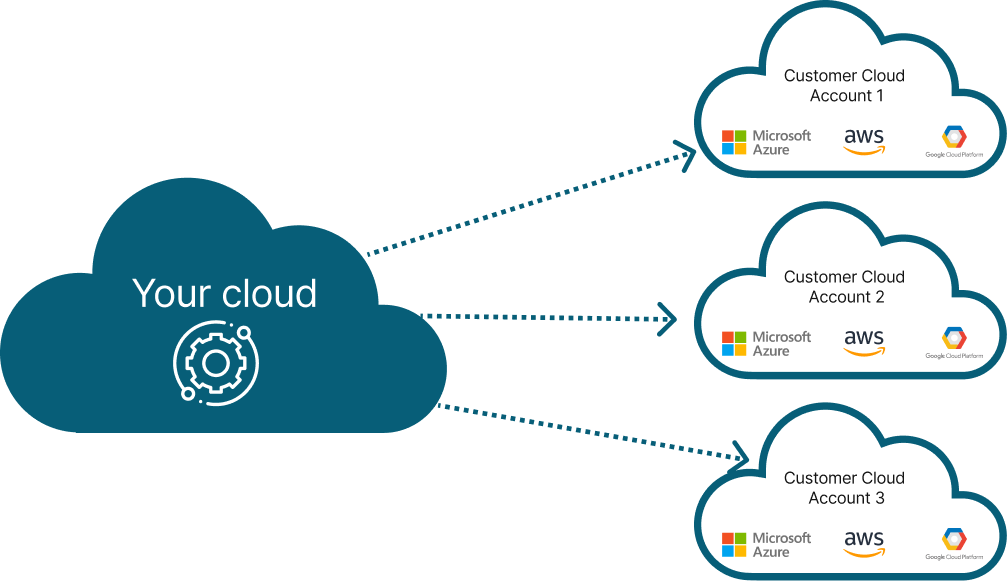
The BYOC architecture separates your control plane from the customer's dataplane:
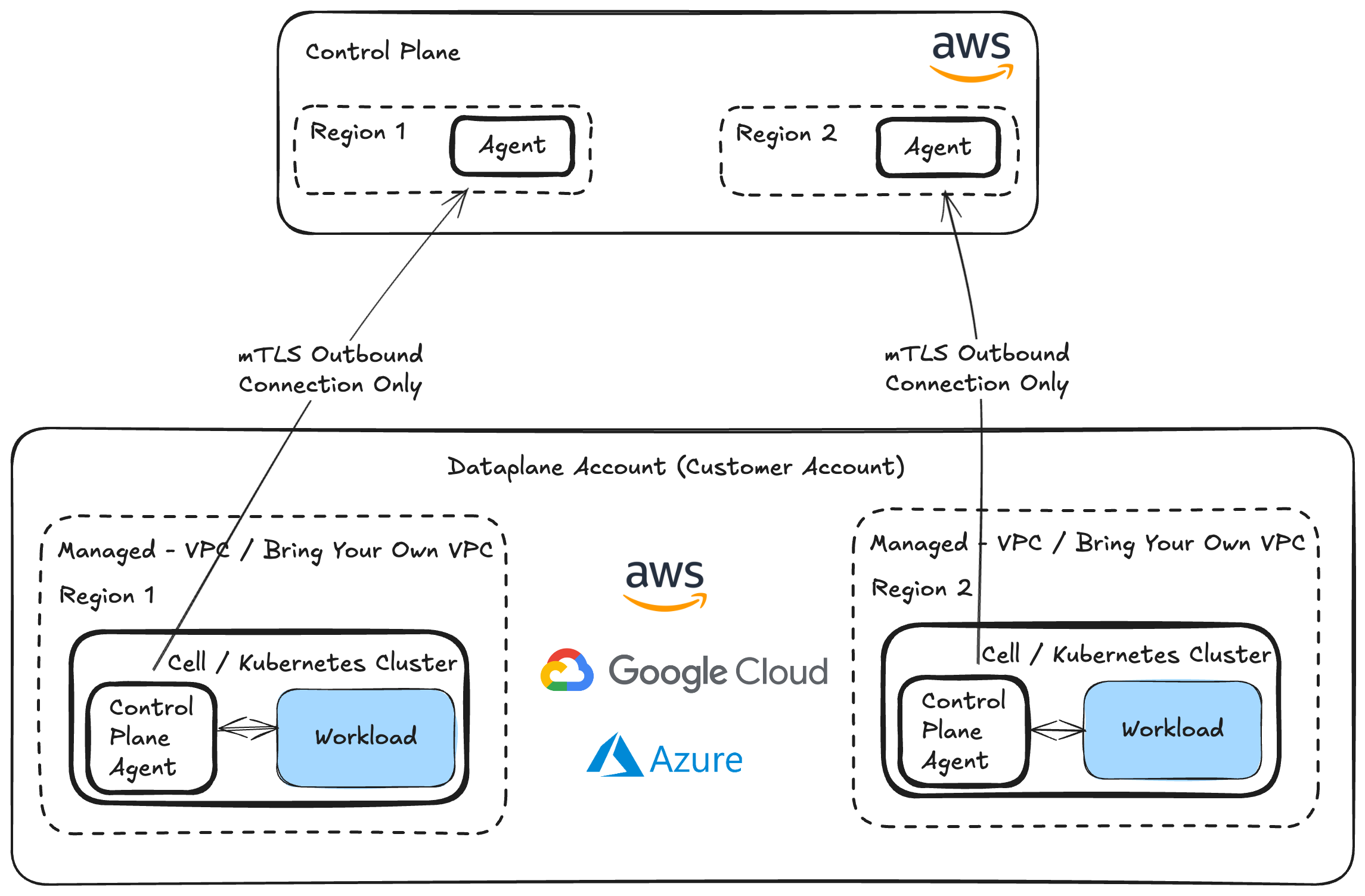
Your generated control plane establishes a scoped trust relationship between your account and the customer's account to automate setup and operations. The control plane agent initiates an outbound, authenticated connection using mTLS and reconciles desired state inside the customer's environment. Your control plane manages workflows, health, and usage without sitting on the customer's application data path.
For the broader security and operating principles behind customer-owned deployments, read BYOC Anywhere: The 10 Commandments.
This page covers two deployment modes: Bring Your Own Cloud (BYOC) and Bring Your Own VPC (BYO-VPC). Both use a BYOC service Plan; the difference is whether your generated control plane creates the deployment network or uses a network the customer already owns.
Deployment modes
| Mode | What the customer brings | What your generated control plane manages |
|---|---|---|
| BYOC | A cloud account with approved permissions | Deployment infrastructure, including a new network when permitted, and the application's lifecycle |
| BYO-VPC | A cloud account and an existing VPC or VNet with approved subnets, routes, and network policies | Application infrastructure and lifecycle within the supplied network boundary |
Bring Your Own Cloud (BYOC)
Your customer onboards their cloud account, and your generated control plane provisions and operates your application inside it. Customers retain ownership of the account, workloads, data, and cloud bill. Your team manages deployments across accounts from a single control plane without exchanging shared static credentials.

To let your customers create new deployment networks through your control plane, enable Allow new cloud-native network creation during customer account onboarding, or pass --allow-create-new-cloud-native-network with the CLI. Otherwise, deployments must reuse a customer-supplied network.
Bring Your Own VPC (BYO-VPC)
BYO-VPC uses the same BYOC Plan and onboarding workflow, but places the dataplane in an existing customer network. Choose this mode when customers need to preserve their CIDR allocation, routing, firewall inspection, DNS, or network segmentation.

Prerequisites
The customer creates the VPC or VNet and workload subnets before deployment. Your generated control plane deploys within that boundary rather than replacing the customer's network configuration.
The following requirements apply across AWS, GCP, and Azure. The specific settings depend on the cloud provider and the customer's network policies:
| # | Requirement | Details |
|---|---|---|
| 1 | Network and subnets | Supply the existing network and workload subnets, with the cloud-specific tags or permissions required for deployment. |
| 2 | DNS resolution | Ensure workloads can resolve the management, cloud-service, and artifact hostnames they need to reach. |
| 3 | Routing and connectivity | Configure routes and approved connectivity paths for management traffic and workload dependencies. |
| 4 | Security rules | Permit required traffic through the customer's firewall and network security rules while preserving their isolation policies. |
| 5 | Cloud services and artifacts | Provide access to required cloud APIs, container registries, and deployment artifacts through approved egress or private service endpoints. |
Cloud-specific configuration references
Use the official cloud documentation below to configure these prerequisites. Choose connectivity options that match the customer's network policies; NAT gateways and public internet access are not required for every deployment.
| Prerequisite | AWS | GCP | Azure |
|---|---|---|---|
| Network and subnets | VPC subnets | VPC networks and subnets | VNet subnets |
| DNS resolution | VPC DNS settings | Cloud DNS | VNet name resolution |
| Routing and connectivity | Route tables, NAT gateways | VPC routes, Cloud NAT | VNet routing, NAT Gateway |
| Security rules | Security groups | VPC firewall rules | Network security groups |
| Cloud service access | VPC endpoints | Private Google Access | Virtual network service endpoints |
AWS example: a VPC with outbound internet access
For this AWS network topology, prepare the following settings:
| # | Requirement | Details |
|---|---|---|
| 1 | Network and subnets | Enable auto-assign public IPv4 address on public subnets. Tag private subnets with kubernetes.io/role/internal-elb = 1, and public subnets with kubernetes.io/role/elb = 1. AWS subnet settings, AWS subnet tags |
| 2 | DNS resolution | Enable DNS hostnames and DNS resolution on the VPC. AWS DNS settings |
| 3 | Routing and connectivity | Provide a public NAT gateway, with routes from the private subnet route tables, for this outbound-internet topology. AWS route tables |
| 4 | Security rules | Configure security groups to permit required management and workload traffic. AWS security groups |
| 5 | Cloud services and artifacts | Ensure required cloud APIs, container registries, and artifact sources are reachable through the approved outbound path. |
How to get started
When creating an instance, set the cloud_provider_native_network_id input parameter to the customer's VPC or network ID. The remaining deployment workflow is the same as BYOC.
Capabilities across both modes
| Capability | What it enables |
|---|---|
| Data sovereignty | Keep application data, storage, backups, and keys inside the customer's environment. |
| Automated onboarding | Establish scoped cloud-account access through self-service or assisted onboarding, without sharing static credentials. |
| Managed lifecycle | Provision, configure, scale, upgrade, back up, restore, and operate instances across customer accounts. |
| Network control | Respect customer-approved subnets, routes, DNS, firewalls, and egress policies. |
| No public ingress | Prevent inbound access from the public internet to the customer's AWS account or deployed services. |
| No direct internet egress | Operate without an Internet Gateway (IGW) or NAT Gateway. Deployments must not depend on downloading Helm charts, container images, code packages, or other artifacts from the public internet; provide them through approved private sources instead. Any permitted outbound traffic must pass through an on-premises firewall. |
| Supply-chain integration | Deliver application images, Helm charts, and other deployment artifacts through approved registries and artifact sources. |
| Fleet visibility and metering | Monitor health, collect operational metrics, and meter usage across deployments from a single control plane. |
| Customer-controlled permissions and auditability | Scope operational access, record actions, and let customers govern and revoke access. See cloud account permissions and audit logs. |
How to enable BYOC
Use the same Plan configuration and account-onboarding workflow for BYOC and BYO-VPC.
You can configure deployment through a Compose specification or a Service Plan specification. Both use byoaDeployment; see the Service Plan deployment schema for the complete reference.
Compose Spec Configuration
For a compose-based specification, configure your provider's control-plane account under byoaDeployment:
x-omnistrate-service-plan:
  deployment:
    byoaDeployment:
      awsAccountId: "<AWS_ACCOUNT_ID>"
      awsBootstrapRoleAccountArn: arn:aws:iam::<AWS_ACCOUNT_ID>:role/omnistrate-bootstrap-role
Replace <AWS_ACCOUNT_ID> with your provider control-plane account ID, not the customer's account ID. This control-plane configuration does not restrict the customer's deployment cloud. See BYOC Deployment for Plan configuration and cloud-account examples.
Service Plan Spec Configuration
For a Service Plan specification, configure deployment at the root level:
name: My Product - BYOC
deployment:
  byoaDeployment:
    awsAccountId: "<AWS_ACCOUNT_ID>"
    awsBootstrapRoleAccountArn: arn:aws:iam::<AWS_ACCOUNT_ID>:role/omnistrate-bootstrap-role
Use your provider control-plane account details, as in the Compose example. See the Service Plan deployment schema and BYOC Deployment: Plan Specification for details.
Account Onboarding
Customer Portal
Customers onboard their cloud account through your Customer Portal and complete the generated bootstrap workflow. AWS uses CloudFormation; GCP and Azure use their cloud-specific onboarding workflows.
omnistrate-ctl
The CLI command below onboards a customer account for BYOC or BYO-VPC. Choose the account flags for the customer's cloud.
AWS
omnistrate-ctl account customer create \
  --service=<service> \
  --environment=<environment> \
  --plan=<plan> \
  --customer-email=<[email protected]> \
  --aws-account-id=<AWS_ACCOUNT_ID>
GCP
omnistrate-ctl account customer create \
  --service=<service> \
  --environment=<environment> \
  --plan=<plan> \
  --customer-email=<[email protected]> \
  --gcp-project-id=<GCP_PROJECT_ID> \
  --gcp-project-number=<GCP_PROJECT_NUMBER> \
  --gcp-service-account-email=<GCP_SERVICE_ACCOUNT_EMAIL>
Azure
omnistrate-ctl account customer create \
  --service=<service> \
  --environment=<environment> \
  --plan=<plan> \
  --customer-email=<[email protected]> \
  --azure-subscription-id=<AZURE_SUBSCRIPTION_ID> \
  --azure-tenant-id=<AZURE_TENANT_ID>
See the account customer create reference for all flags, and the AWS, GCP, Azure, and Nebius onboarding guides for bootstrap steps.
Videos
For AWS account bootstrap, see the CloudFormation onboarding video. For the customer experience, see the BYOC demo.
PrivateLink
PrivateLink is a connectivity capability for both BYOC and BYO-VPC, not a third deployment mode or an offline mode. It carries management traffic between the control plane agent and your generated control plane over private connectivity instead of the public internet, while preserving the customer's account and network ownership.
Use it when customers require private control-plane connectivity, restricted public exposure, or tighter egress policies. The endpoint setup, routing, and DNS configuration follow the customer's cloud and network topology. The implementation details below illustrate an AWS deployment, not a restriction on which clouds can use private connectivity.
Connectivity setup
Start with the BYOC account-onboarding workflow. The portal and CLI onboarding commands are general BYOC operations; private connectivity adds the management endpoint and its network configuration.
BYOC PrivateLink Architecture
The following diagram shows the AWS endpoint implementation:
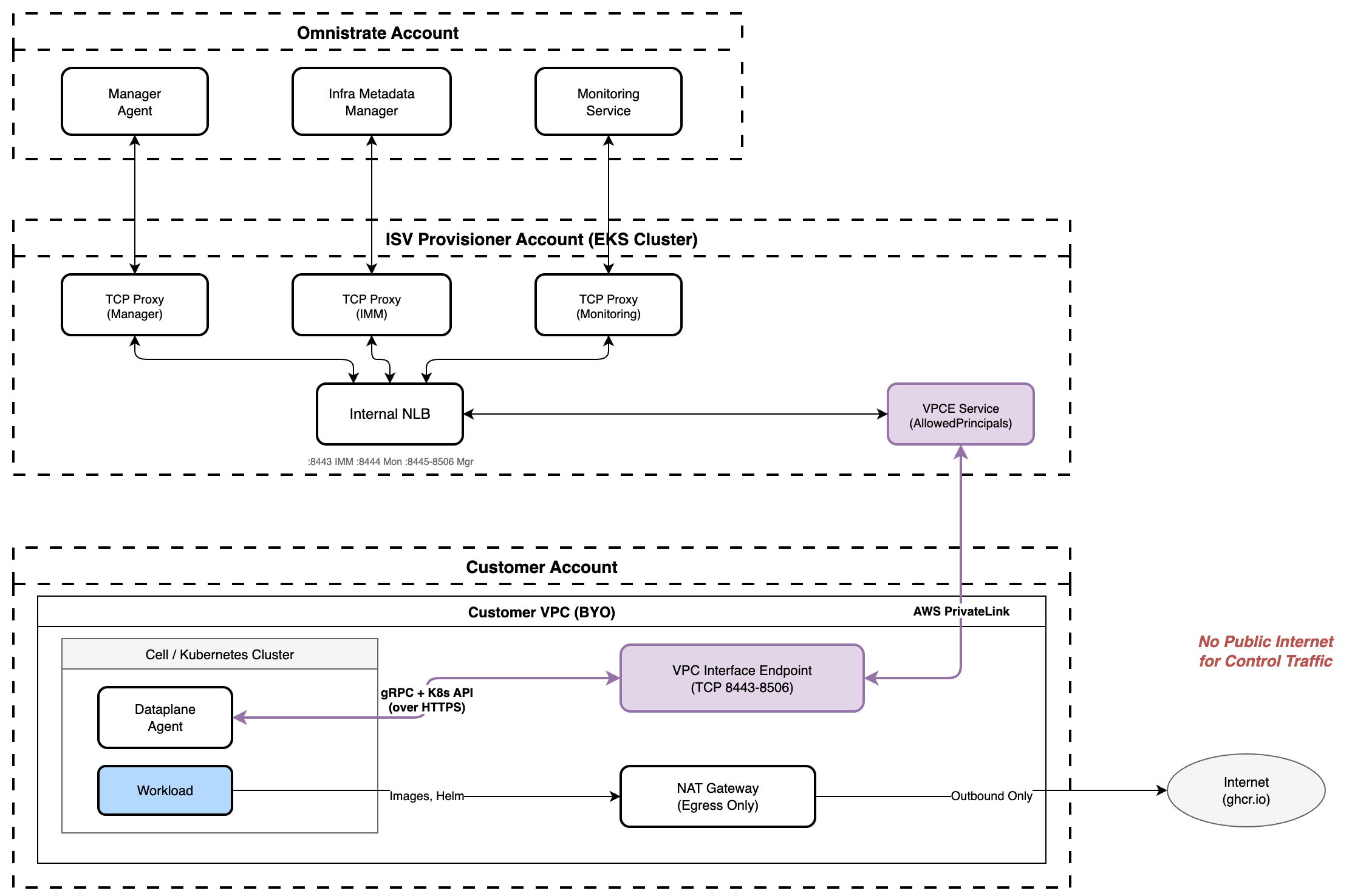
In this example, the control plane agent connects through a VPC Interface Endpoint targeting the endpoint service your control plane provides. When the account first onboards, your control plane configures the endpoint service and adds the customer's account to its AllowedPrincipals list. Control traffic does not traverse the public internet.
Customer VPC Topology
Private connectivity works with both network ownership modes:
- Control-plane-managed VPC — Your control plane provisions the VPC, subnets, security group, and required endpoints on first deployment. Networks with outbound egress include a NAT gateway; endpoint-only networks use private service endpoints. Network creation must be allowed during account onboarding. See Control-plane-managed VPC for the AWS setup.
- Customer-owned VPC (BYO-VPC) — The customer supplies the network, subnets, routes, DNS, and management endpoint. Your generated control plane validates connectivity and deploys within the supplied network. See Imported VPC requirements for the AWS setup.
AWS endpoint configuration example
For an existing AWS VPC, prepare the following resources:
| # | Requirement | Details |
|---|---|---|
| 1 | VPC & subnet tags | Tag the VPC and workload subnets with omnistrate.com/managed-by = omnistrate. This tag gates IAM permissions and selects subnets for EKS nodegroup placement — tag only the subnets intended for workloads. |
| 2 | DNS settings | Enable DNS hostnames (enableDnsHostnames) and DNS resolution (enableDnsSupport). |
| 3 | Cloud service and artifact connectivity | Provide approved outbound egress or the complete endpoint-only set. |
| 4 | Management VPC Endpoint | Create an Interface VPC Endpoint targeting the service name your control plane provides. Tag it Name = omnistrate-byoc-private-vpce-<provisioner-hc-id>. Its security groups must allow inbound TCP 8443–8506 from the VPC CIDR and carry omnistrate.com/managed-by = omnistrate for debug-access rule management. |
| 5 | Cross-region (if applicable) | If the customer VPC and endpoint service are in different AWS regions, pass --service-region <region> when creating the endpoint, or service_region in Terraform. Leave private DNS disabled for cross-region interface endpoints. |
| 6 | Subnet tags (optional) | Tag private subnets with kubernetes.io/role/internal-elb = 1, and public subnets with kubernetes.io/role/elb = 1 when using the corresponding load balancers. |
Note
Your control plane provides the endpoint service name and provisioner host-cluster ID after account onboarding. Both are needed to create the AWS management endpoint.
For complete topology, routing, DNS, and security-group requirements, see Imported VPC requirements for BYOC PrivateLink.
CloudFormation Controls
In the AWS onboarding stack, AgentInfrastructureMutationEnabled controls infrastructure mutation. For private-connectivity host clusters, DataplaneKubernetesAccessRole controls the agent's Kubernetes permissions and K8sDebugAccessEnabled controls the debug-access network path. DataplaneKubernetesAccessTargets and K8sDebugAccessTargets scope the Kubernetes controls to regions or host clusters. See AWS CloudFormation Account Controls for values, updates, and verification.
Artifact delivery without internet access
A private management connection does not automatically provide access to cloud APIs or deployment artifacts. Configure the required service endpoints or approved egress paths for images, Helm charts, and Terraform or OpenTofu dependencies. For the AWS endpoint-only configuration, see endpoint-only connectivity and private registry configuration.
BYOC in action
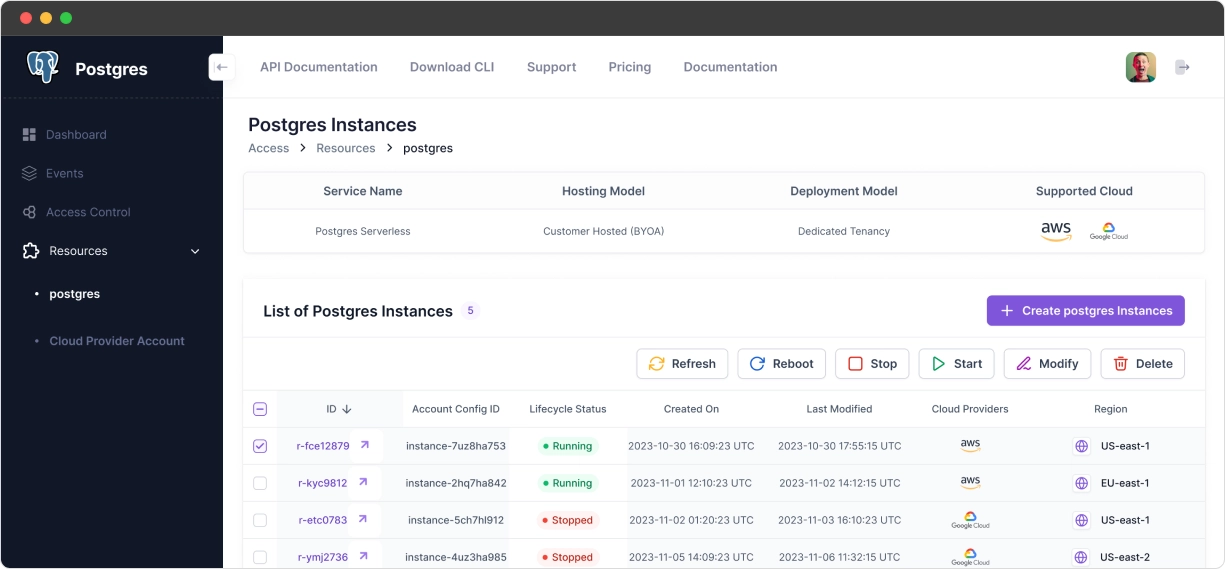
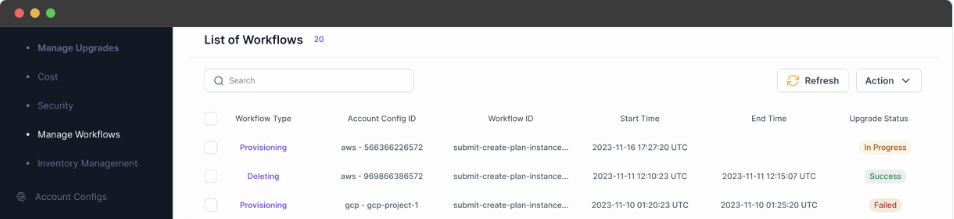
Your generated control plane gives customers a self-service experience while your team operates instances across the fleet.
View for your customers
Internal view for your teams
Demo video
Watch the Customer Portal demo for Supabase single-tenant SaaS and BYOC built with Omnistrate: