Understanding Omnistrate pricing
Omnistrate pricing is designed to be transparent, predictable, and aligned with the scale of your application deployments.
Rather than charging against your entire cloud or Kubernetes footprint, Omnistrate charges for billable deployments and/or the active compute capacity of eligible application workloads, depending on the deployment model.
Your exact rates and monthly commitment are defined in your commercial agreement.
How pricing works
Omnistrate pricing has three primary components:
- Deployment-based pricing: Where applicable, a fixed monthly fee for each billable deployment.
- vCPU-based pricing: A usage charge calculated from the cumulative vCPU-hours of eligible active application workloads.
- Monthly minimum commitment: A minimum monthly platform commitment toward which all eligible deployment and vCPU charges are credited.
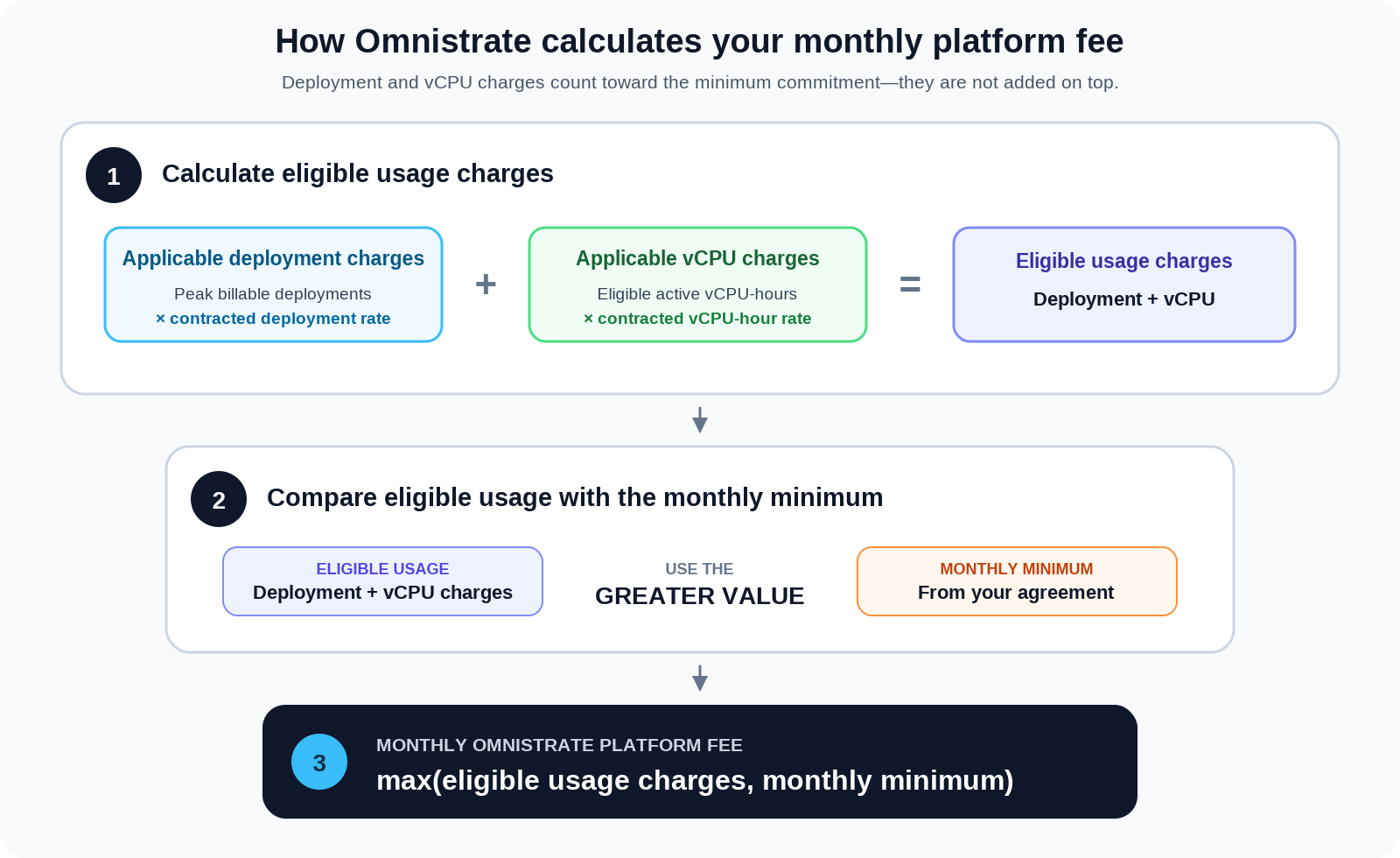
The monthly calculation is:
eligible usage charges = deployment charges + vCPU charges

monthly Omnistrate platform fee = greater of:
  • monthly minimum commitment
  • eligible usage charges
The minimum is not an additional charge
Deployment and vCPU charges count toward the monthly minimum commitment. Omnistrate does not add the minimum on top of those eligible usage charges.
Which pricing dimensions may apply?
The pricing dimensions that apply depend on the deployment model.
| Deployment model | Deployment-based pricing | vCPU-based pricing |
|---|---|---|
| Hosted SaaS | Not applicable | Applicable |
| BYOC Anywhere — customer cloud account | Applicable | Applicable |
| BYOC Anywhere — customer-managed Kubernetes (BYOC-K8s) | Applicable | Not applicable |
| Air-gapped | Applicable | Not applicable |
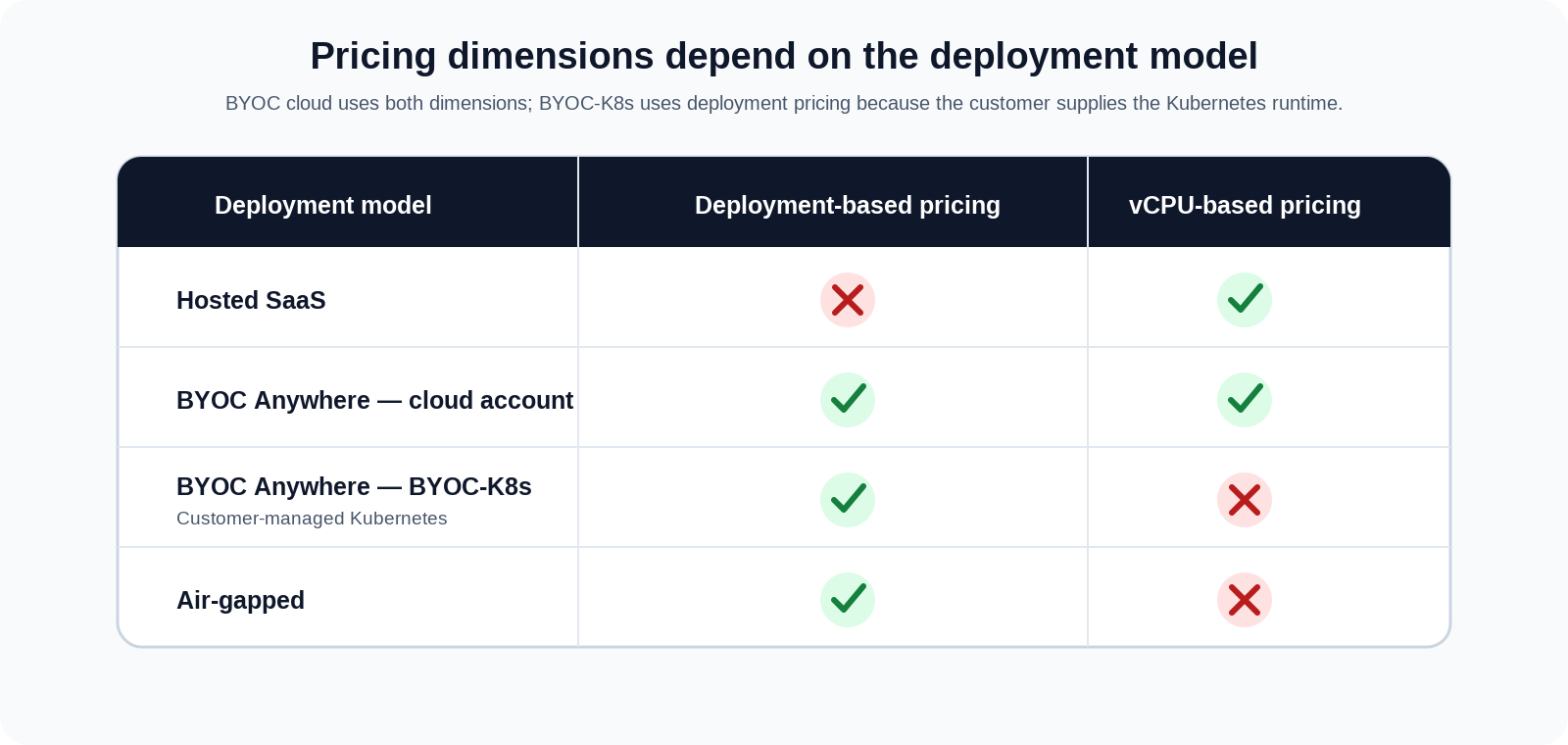
This means:
- BYOC customer-account, BYOC-K8s, and air-gapped deployments can contribute deployment-based charges.
- Hosted SaaS and BYOC customer-account deployments can contribute vCPU-hour charges.
- Hosted SaaS does not contribute deployment-based charges.
- BYOC-K8s and air-gapped deployments do not contribute vCPU-hour charges.
BYOC Anywhere is the umbrella for software running in a customer-controlled environment. This pricing guide separates two connected BYOC patterns because they have different compute-responsibility boundaries:
- In a BYOC customer cloud account, Omnistrate provisions and meters eligible application compute in the customer's cloud account, so both deployment and vCPU pricing can apply.
- In BYOC-K8s, the customer supplies the Kubernetes runtime and its underlying capacity. Omnistrate manages application deployments on that existing runtime, so deployment pricing can apply but Omnistrate vCPU pricing does not.
Air-gapped deployments are shown separately because they do not maintain a live connection to the Omnistrate control plane.
For an operational comparison of these models, see Deployment models and BYOC Anywhere.
Understanding vCPU-based pricing
A vCPU-hour represents one virtual CPU of eligible application compute capacity that is provisioned and active for one hour.
vCPU-hours = provisioned eligible vCPUs × active hours
vCPU charge = total eligible vCPU-hours × contracted vCPU-hour rate
Omnistrate measures provisioned capacity, not actual CPU utilization. For example, a workload provisioned with four vCPUs for ten hours produces 40 vCPU-hours even if it uses only a fraction of that capacity during the period.
Usage is metered with a minimum granularity of one hour.
| Application capacity | Active duration | Billable vCPU-hours |
|---|---|---|
| 1 vCPU | 10 hours | 10 |
| 4 vCPUs | 10 hours | 40 |
| 8 vCPUs | 1 hour | 8 |
| 4 vCPUs while paused | 10 hours | 0 |
At the end of the billing period, Omnistrate aggregates eligible vCPU-hours across your deployments and applies the vCPU-hour rate in your commercial agreement.
How lifecycle changes affect vCPU-hours
Billable compute usage adjusts as application capacity changes:
| Application event | Effect on future vCPU-hours |
|---|---|
| Scale up | Newly provisioned capacity begins accumulating usage while active |
| Scale down | Removed capacity stops accumulating usage |
| Pause or stop | Paused capacity accumulates zero vCPU-hours |
| Resume | Provisioned capacity begins accumulating usage again |
| Terminate | Terminated capacity stops accumulating usage |
Usage accumulated before a workload is paused, stopped, scaled down, or terminated remains part of the billing-period total.
What is included in vCPU-based pricing?
Omnistrate counts active application compute capacity directly provisioned through your Omnistrate-generated control plane.
This includes:
- Active application compute instances
- Active application replicas, including high-availability replicas
- Additional application capacity provisioned through autoscaling
- Active batch-processing and background workloads
- Temporary application capacity provisioned to handle bursts in demand
Each resource contributes only for the duration that its provisioned capacity is active, subject to hourly metering granularity.
What is excluded from vCPU-based pricing?
Omnistrate does not calculate vCPU charges from the entire compute footprint of your cloud environment or Kubernetes infrastructure.
| Resource | Included in Omnistrate vCPU billing? |
|---|---|
| Active application compute managed by Omnistrate | Yes |
| Kubernetes system nodes | No |
| Control-plane and supporting system infrastructure | No |
| Paused application nodes | No |
| Terminated application nodes | No |
| Unused or unallocated infrastructure capacity | No |
| Third-party managed services | No |
| Object storage, such as Amazon S3 | No |
| Networking and load balancers | No |
| Existing workloads outside Omnistrate management | No |
Third-party managed services remain excluded even when Omnistrate orchestrates their provisioning, configuration, upgrades, or lifecycle.
For example, if Omnistrate provisions an application with Amazon RDS, Amazon ElastiCache, or Google BigQuery, only the eligible application compute contributes vCPU-hours. The managed service's underlying compute does not.
Excluded from Omnistrate pricing does not mean free
Cloud providers and third-party vendors can still charge for excluded infrastructure. Omnistrate platform fees and underlying infrastructure charges are separate.
Detailed vCPU example: a 30-day month
Consider one managed application deployment during a 30-day billing period containing 720 hours:
| Resource | Configuration | Calculation | Billable vCPU-hours |
|---|---|---|---|
| Base application workload | 2 vCPUs running continuously | 2 × 720 | 1,440 |
| Autoscaling capacity | 4 additional vCPUs active for 10 hours | 4 × 10 | 40 |
| Amazon RDS | 4 vCPUs running continuously | Excluded managed service | 0 |
| Kubernetes system nodes | 8 vCPUs running continuously | Excluded system capacity | 0 |
| Paused application nodes | 4 provisioned vCPUs while paused | Inactive | 0 |
| Total | 1,480 |
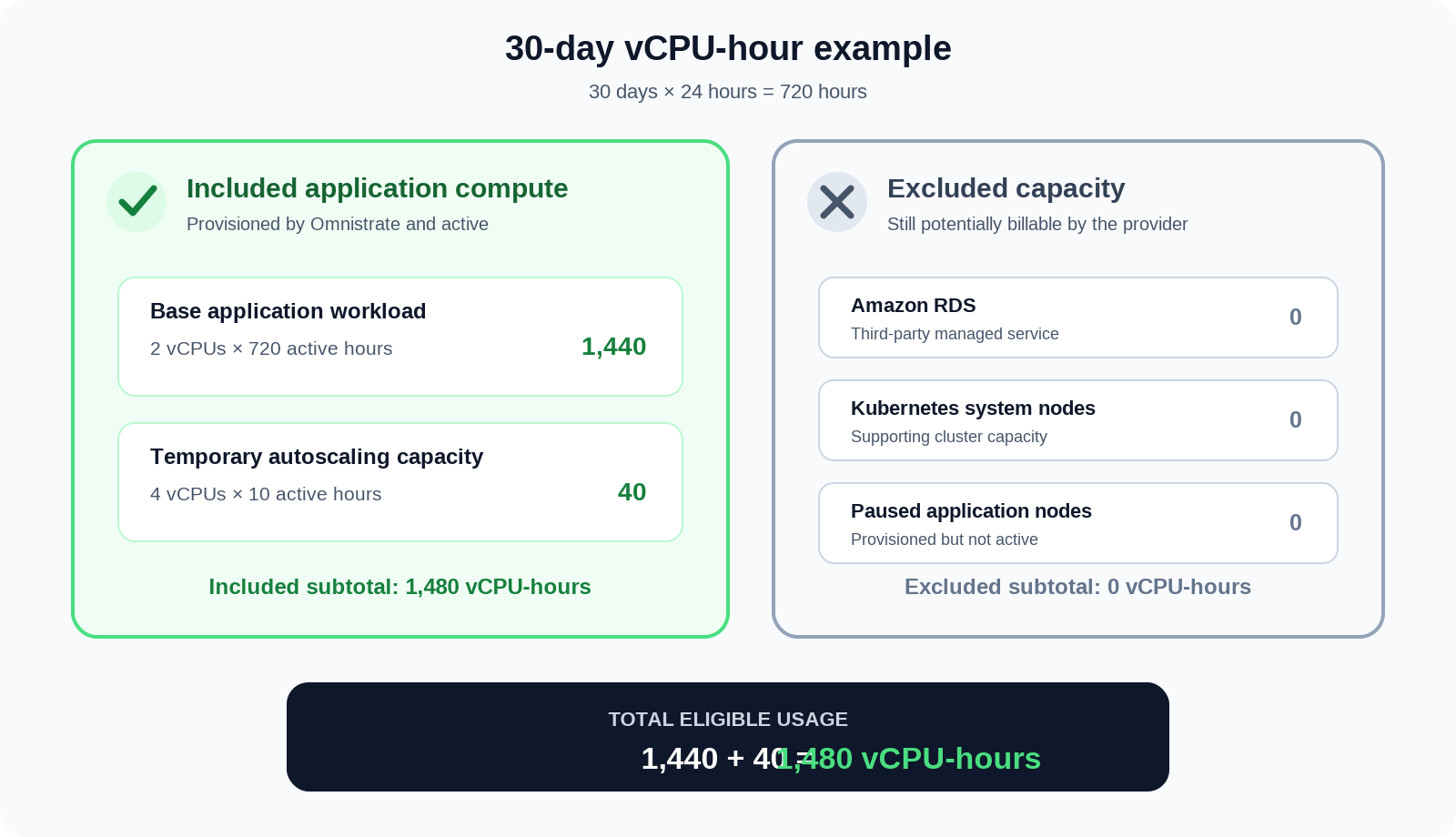
The calculation happens in three steps:
- The continuously running application contributes 1,440 vCPU-hours.
- Temporary autoscaling contributes another 40 vCPU-hours.
- RDS, Kubernetes system nodes, and paused application nodes contribute zero Omnistrate vCPU-hours.
total eligible vCPU usage = 1,440 + 40 = 1,480 vCPU-hours
vCPU charge = 1,480 × contracted vCPU-hour rate
For example, using an illustrative rate of $0.05 per vCPU-hour:
The $0.05 rate is only an example. Use the rate in your commercial agreement for an actual estimate.
How deployment-based pricing works
Deployment-based pricing aligns with the number of application deployments provisioned and managed through your Omnistrate-generated control plane.
For each deployment model:
deployment charge = peak concurrent billable deployments
                    × contracted monthly rate for that deployment model
Only deployments provisioned and managed through Omnistrate are included.
Hosted SaaS
Deployment-based pricing does not apply to Hosted SaaS. Hosted SaaS contributes eligible vCPU-hour charges instead.
What counts as a billable deployment?
A billable deployment follows its billing lifecycle, which is separate from its runtime or health status. A deployment contributes to the concurrent count at any instant that is at or after its billable start timestamp and before its billable end timestamp. Use those timestamps in the detailed usage record rather than treating only RUNNING deployments as billable.
| Deployment condition | How it affects the deployment count |
|---|---|
| Provisioning | Included only after the billable start timestamp |
| Running or updating | Included while the billable interval is open |
| Failed | Included while the billable interval is open; failure status alone does not close it |
| Stopped or paused | Included while the billable interval is open; pausing stops eligible vCPU accumulation but does not close the deployment billing interval |
| Pending deletion | Included until the billable end timestamp |
| Deleted | Excluded at and after the billable end timestamp |
The exact events that set the billable start and end timestamps are defined by your commercial agreement and shown in the detailed usage record. If those terms are not stated in your agreement or invoice, request the record from your Omnistrate account representative or [email protected] before estimating the charge.
A brief deployment can set the monthly peak
A deployment that is billable for only part of a month—even briefly—can increase the concurrent monthly peak. Individual deployment charges are not prorated based on how long that deployment existed within an intermediate month.
The monthly peak determines the deployment count
Omnistrate uses the highest number of concurrent billable deployments reached during the calendar month.
| Period | Concurrent billable deployments |
|---|---|
| Days 1–10 | 3 |
| Days 11–20 | 5 |
| Days 21–30 | 4 |
| Billable deployment count | 5 |
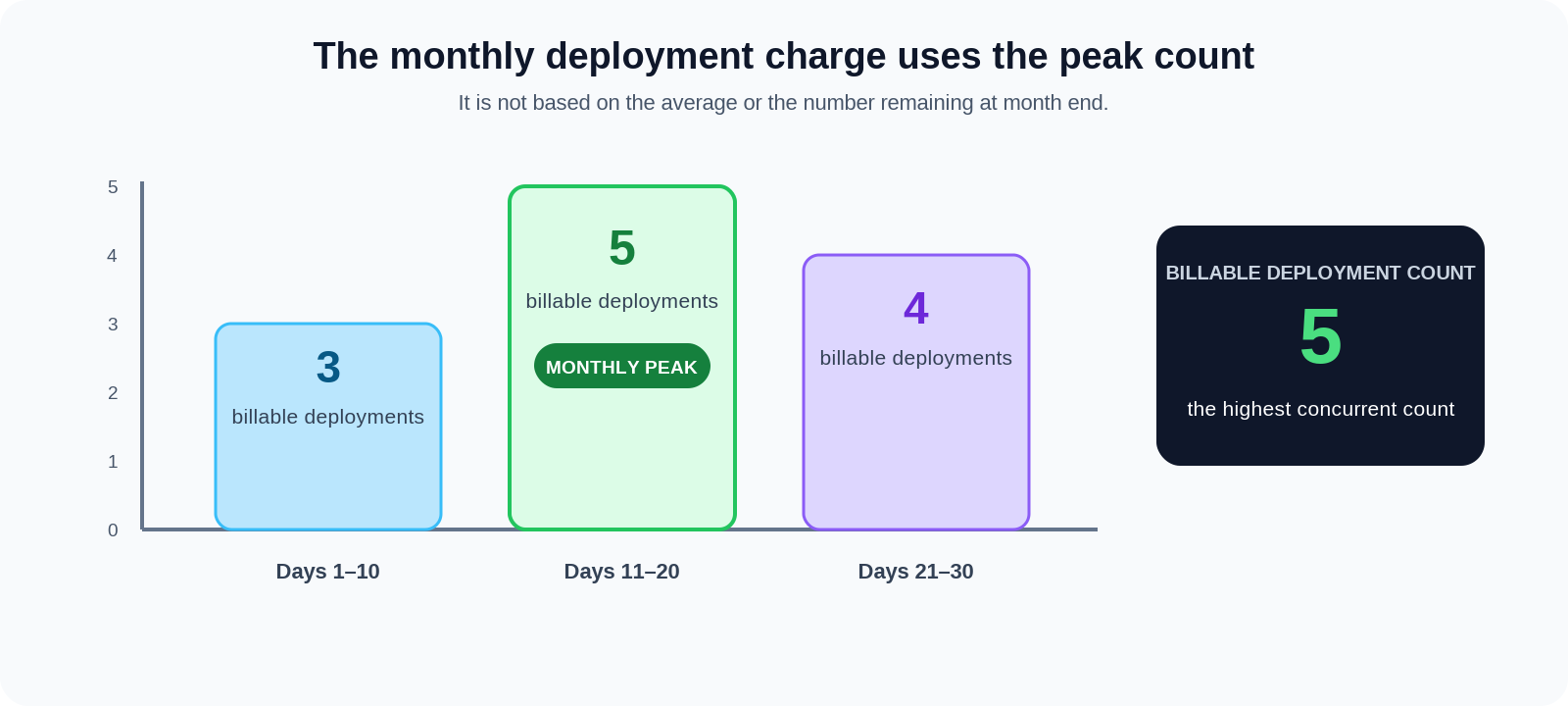
The deployment charge is based on five deployments even though only four remain billable at the end of the month. It is not based on the month-end count or an average.
Proration rules
Deployment fees are not prorated when individual deployments are added or removed during a billing month. The monthly peak-count calculation still applies.
There is one deployment-fee exception:
- In a customer's first billable month, deployment fees are prorated based on the number of billable calendar days.
- In a customer's final billable month, deployment fees are prorated based on the number of billable calendar days.
Use this formula:
- The denominator is the actual number of calendar days in that month: 28, 29, 30, or 31.
- The first and final billable dates are included when the customer is billable on those dates.
- Day boundaries use the billing timezone stated in the commercial agreement or detailed usage record. Do not infer the billing timezone from a browser or console timezone; request confirmation if it is not stated.
- This rule prorates deployment fees only. It does not automatically prorate the monthly minimum commitment. Apply the minimum commitment specified for the first or final month in the commercial agreement or invoice.
Example: first-month proration
Assume an illustrative per-deployment monthly rate of $100, a peak of four billable deployments, and 15 billable days in a 30-day first month:
full-month deployment charge = 4 × $100 = $400
first-month proration = 15 ÷ 30 = 50%
prorated deployment charge = $400 × 50% = $200
For a full intermediate billing month, the same peak of four deployments would produce the complete $400 deployment charge.
Multiple deployment models
Different deployment models can have different per-deployment rates. Omnistrate calculates the peak independently for each model, applies that model's rate, and adds the resulting charges.
Assume these illustrative rates and monthly peaks:
| Deployment model | Monthly peak | Illustrative rate | Deployment charge |
|---|---|---|---|
| BYOC Anywhere — customer cloud account | 2 | $500 per deployment | $1,000 |
| BYOC-K8s | 3 | $200 per deployment | $600 |
| Air-gapped | 1 | $100 per deployment | $100 |
| Total deployment charge | $1,700 |
BYOC customer-account deployments can additionally contribute vCPU-hour charges. BYOC-K8s and air-gapped deployments do not.
Monthly minimum commitment and support tiers
Your monthly minimum commitment is based on your selected support tier and commercial agreement.
All eligible deployment and vCPU charges count toward the commitment:
eligible usage charges = deployment charges + vCPU charges

monthly Omnistrate platform fee = max(
  monthly minimum commitment,
  eligible usage charges
)
Example: usage is below the minimum
Assume the following illustrative totals:
| Component | Charge |
|---|---|
| Deployment charges | $1,700 |
| vCPU charges | $74 |
| Eligible usage charges | $1,774 |
| Monthly minimum commitment | $2,000 |
| Monthly Omnistrate platform fee | $2,000 |
The customer pays $2,000—not $3,774—because the $1,774 of eligible usage is credited toward the monthly minimum.
Example: usage exceeds the minimum
Assume eligible deployment and vCPU charges total $2,450 against a $2,000 monthly minimum:
There is no additional minimum-commitment charge or separate support fee added after usage exceeds the minimum.
Scope and treatment of the commitment
The commercial agreement defines the scope to which a monthly minimum applies. The scope may be an Omnistrate organization or account, a product or service, or another expressly defined commercial grouping.
- Eligible deployment and vCPU charges pool only when they fall within the same commitment scope.
- Usage across deployment models counts together only when those models are included in that same scope.
- An unused portion of the commitment does not carry forward unless the commercial agreement explicitly provides a carry-forward.
- Add-ons, third-party charges, professional services, taxes, and other fees count toward the minimum only when the commercial agreement expressly identifies them as eligible.
- First- and final-month deployment-fee proration does not by itself prorate the minimum commitment. Use the commitment amount specified for that month in the agreement or invoice.
If the agreement does not name the commitment scope or eligible charges, confirm them with your Omnistrate account representative before combining usage in an estimate.
For support coverage and service-level commitments, see the Omnistrate Service Level Agreement.
Third-party infrastructure costs
Omnistrate platform fees are separate from underlying cloud infrastructure and third-party service charges.
The party receiving the underlying infrastructure bill depends on who owns the cloud account, cluster, or physical environment:
| Deployment model | Where the application infrastructure runs | Who receives the infrastructure bill |
|---|---|---|
| Hosted SaaS | Software provider's cloud account | The owner of the provider cloud account, typically the software provider |
| BYOC Anywhere — customer cloud account | End customer's cloud account or VPC | The owner of the customer cloud account, typically the end customer |
| BYOC-K8s | Customer-managed Kubernetes cluster | The cluster or backing-infrastructure owner |
| Air-gapped | Customer-controlled disconnected environment | The owner or operator of the environment, including any hardware or infrastructure-provider charges |
Omnistrate platform fees are billed separately to the contracting Omnistrate customer. Omnistrate-operated control-plane services are part of the platform service and are not the same as application-infrastructure charges in the table.
Exclusion from Omnistrate vCPU-based pricing does not mean that the underlying infrastructure is free of cloud-provider charges. For example:
- RDS can contribute zero Omnistrate vCPU-hours while still appearing on the AWS bill.
- Paused application compute can contribute zero Omnistrate vCPU-hours while retained storage continues to incur provider charges.
- Networking, load balancers, and object storage can incur provider charges even though they are excluded from Omnistrate vCPU billing.
Common questions
Is vCPU pricing based on actual CPU utilization?
No. It uses provisioned eligible application capacity, not average or peak CPU utilization.
Do paused or terminated application nodes accumulate vCPU-hours?
No. They stop accumulating vCPU-hours while paused or after termination. Usage accumulated while they were active remains billable.
Are Kubernetes system nodes included in vCPU pricing?
No. Kubernetes system nodes and supporting control-plane infrastructure are excluded.
Are managed services such as RDS included?
No. Third-party managed services are excluded even when Omnistrate manages their lifecycle.
Do BYOC-K8s or air-gapped deployments have vCPU charges?
No. They have deployment-based pricing, but vCPU-based pricing does not apply.
Does Hosted SaaS have deployment-based charges?
No. Deployment-based pricing does not apply to Hosted SaaS; eligible vCPU-hour pricing applies instead.
Is the deployment charge based on the month-end count?
No. It uses the peak number of concurrent billable deployments during the calendar month.
Are deployment fees prorated?
Individual deployments added or removed during an intermediate billing month are not prorated. Deployment fees are prorated by billable calendar days for the customer's first and final billable months.
Does pausing a deployment remove it from the deployment count?
Not by itself. Pausing stops eligible application compute from accumulating vCPU-hours, but the deployment can continue to count while its deployment billing lifecycle remains open. Use the billable timestamps in the detailed usage record.
Is the monthly minimum added on top of usage?
No. Eligible deployment and vCPU charges are credited toward the minimum. You pay the greater of the minimum or eligible usage.
How to verify the inputs on your bill
Use the platform-pricing invoice breakdown or detailed usage record associated with your Omnistrate commercial account. It should show:
- The billing period and billing timezone
- Billable start and end timestamps for deployments
- Peak concurrent deployment counts by applicable deployment model
- Eligible vCPU-hours for Hosted SaaS and BYOC customer-account workloads
- Contracted rates, first- or final-month proration, and the applicable monthly minimum
- How eligible charges were credited toward the minimum
Availability of these details in a self-service invoice view depends on your account configuration. If the invoice or console does not expose them, request the detailed platform usage record from your Omnistrate account representative or [email protected].
Tenant metering is different
The tenant usage metering and export features help you meter and bill your own SaaS customers. They are not the authoritative record for the Omnistrate platform fee described on this page.
Quick estimation checklist
- Confirm the commitment scope, eligible charge types, billing timezone, and first- or final-month terms in your commercial agreement.
- Obtain the invoice breakdown or detailed platform usage record.
- List each deployment model that you use.
- For models with deployment-based pricing, find the peak concurrent billable deployment count from the billable timestamps.
- Multiply each applicable peak by that model's contracted monthly deployment rate.
- Apply first- or final-month calendar-day proration to deployment fees when applicable.
- For Hosted SaaS and BYOC customer-account deployments, total eligible active application vCPU-hours.
- Multiply eligible vCPU-hours by the contracted vCPU-hour rate.
- Add eligible deployment and vCPU charges within the same commitment scope.
- Compare eligible charges with the applicable monthly minimum. The greater amount is the monthly Omnistrate platform fee.
- Estimate cloud-provider and third-party infrastructure charges separately according to the account or environment owner.
Summary
- Outcome-based pricing: Where deployment-based pricing applies, pay for billable deployments provisioned and managed through your Omnistrate-generated control plane.
- Usage-based pricing: Where applicable, pay for active eligible application compute measured in vCPU-hours.
- vCPU-hours use provisioned capacity, are metered hourly, and are aggregated across deployments.
- Kubernetes system nodes, paused or terminated resources, third-party managed services, networking, and object storage are excluded from Omnistrate vCPU billing.
- BYOC-K8s and air-gapped deployments do not contribute vCPU-hour charges.
- Hosted SaaS does not contribute deployment-based charges.
- Deployment charges use the monthly peak count, calculated independently by deployment model.
- Pausing stops vCPU accumulation but does not by itself end the deployment billing lifecycle.
- Individual deployment additions and removals are not prorated during intermediate months; first and final billable months use calendar-day proration.
- Eligible deployment and vCPU charges count toward the monthly minimum commitment rather than being added on top of it, within the commitment scope defined by the commercial agreement.
- Cloud-provider and third-party infrastructure charges remain separate.